
Kia Cee'd: Button Engine Start System / Start/Stop Button Components and components location
Kia Cee'd JD Service Manual / Body Electrical System / Button Engine Start System / Start/Stop Button Components and components location
| Component |
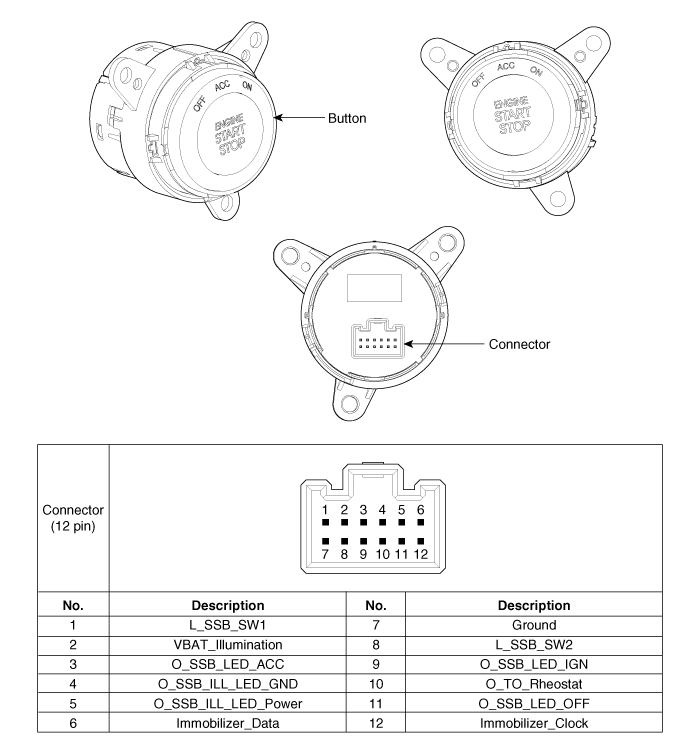
 Description and operation
Description
System Overview
The System offers the following features:
–
Human machine interface through a 1-stage button, for terminal switching
and en ...
 Start/Stop Button Repair procedures
Removal
1.
Disconnect the negative (-) battery terminal.
2.
Remove the crash pad center fascia panel.
(Refer to Body - "Ce ...
Other information:
Kia Cee'd JD Owners Manual: Warning message
The message will appear when camera’s
field of view is covered by some objects.
The system stops until the field of view is
normal.
Check the windshield around the camera
view area.
If the system does not work normally
even though camera’s field of view is
cleared, we recommend t ...
Kia Cee'd JD Service Manual: Troubleshooting
Troubleshooting
Symptom
Possible cause
Remedy
Hard steering
Improper front wheel alignment
Excessive turning resistance of lower arm ball joint
Low tire pressure
No power assist
Correct
...
© 2017-2026 www.kceed.com
