
Kia Cee'd: LCD display information / Parking assist warning
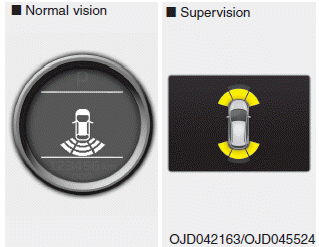
Displays the area an obstacle is detected while moving forward or rearward.
For more details, refer to “Parking assist system” in chapter 4.
 Turn on "FUSE SWITCH" (mode switch)
The notice appears to inform the driver to
turn on the fuse switch in the instrument
panel under the steering wheel.
For more details, refer to “Fuses” in chapter
7. ...
 Align steering wheel
If you start the engine when the steering
wheel is turned 90 degrees to the left (or
right) after a couple of seconds, “Align
steering wheel” illuminates on the LCD
display for 5 seconds ...
Other information:
Kia Cee'd JD Service Manual: Fuel Pump Motor Repair procedures
Removal
1.
Remove the fuel pump.
(Refer to Fuel Delivery System - “Fuel Pump”)
2.
Disconnect the electric pump & sender wiring connector (A).
3.
Remove the fuel feed tube (A) from ...
Kia Cee'd JD Owners Manual: Maintenance when trailer towing
Your vehicle will need service more often
when you regularly pull a trailer.
Important items to pay particular attention
to include engine oil, automatic
transaxle fluid, axle lubricant and cooling
system fluid. Brake condition is another
important item to frequently check. Each
item i ...
