
Kia Cee'd: LCD display information / Align steering wheel
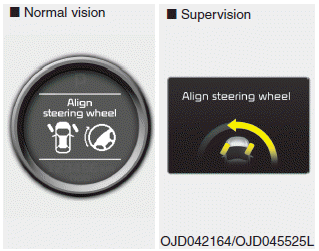
If you start the engine when the steering wheel is turned 90 degrees to the left (or right) after a couple of seconds, “Align steering wheel” illuminates on the LCD display for 5 seconds.
Turn the steering wheel to the right (or left) and make it turned to the left (or right) less than 30 degrees.
 Parking assist warning
Displays the area an obstacle is detected
while moving forward or rearward.
For more details, refer to “Parking assist
system” in chapter 4. ...
 For vehicle’s equipped with smart
key system
For vehicle’s equipped with smart
key system
Key not in vehicle
If the smart key is not in the vehicle and
if any door is opened or closed with the
engine start/stop button in the ACC, ON,
or START position, the warning illuminates
on ...
Other information:
Kia Cee'd JD Owners Manual: Installing a child restraint system by
lap/shoulder belt
To install a child restraint system on the
outboard or center rear seats, do the following:
1. Place the child restraint system in the
seat and route the lap/shoulder belt
around or through the restraint, following
the restraint manufacturer’s
instructions. Be sure the seat belt webbi ...
Kia Cee'd JD Service Manual: SRS Control Module (SRSCM) Description and operation
Description
The primary purpose of the SRSCM (Supplemental Restraints System Control Module)
is to discriminate between an event that warrants restraint system deployment
and an event that does not. The SRSCM must decide whether to deploy the restraint
system or not. After d ...
