
Kia Cee'd: LCD display information / Turn on "FUSE SWITCH" (mode switch)
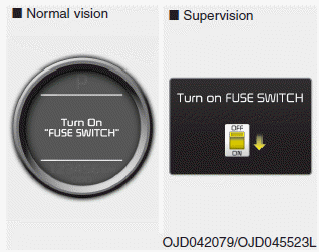
The notice appears to inform the driver to turn on the fuse switch in the instrument panel under the steering wheel.
For more details, refer to “Fuses” in chapter 7.
 Illumination intensity
The illumination intensity of the instrument
panel is shown when adjusting it
with the illumination control switch.
For more details, refer to “Instrument
panel illumination” in chapter 4 ...
 Parking assist warning
Displays the area an obstacle is detected
while moving forward or rearward.
For more details, refer to “Parking assist
system” in chapter 4. ...
Other information:
Kia Cee'd JD Service Manual: Smart Key Repair procedures
Smart Key
Smart Key Code Saving
1.
Connect the DLC cable of GDS to the data link connector in driver side
crash pad lower panel, turn the power on GDS.
2.
Select the vehicle model and then do "Smart key code savin ...
Kia Cee'd JD Owners Manual: Cleaning the leather seats
Remove all contaminations instantly.
Refer to instructions below for removal
of each contaminant.
Cosmetic products(sunscreen, foundation,
etc.)
- Apply cleansing cream on a cloth and
wipe the contaminated point. Wipe off
the cream with a wet cloth and
remove water with a dr ...
