
Kia Cee'd: Lighting / Lighting control
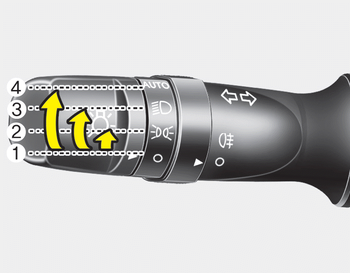
The light switch has a Headlight and a Parking light position.
To operate the lights, turn the knob at the end of the control lever to one of the following positions:
(1) OFF position
(2) Position light position
(3) Headlight position
(4) Auto light position (if equipped)
- Position light position
- Headlight position
- Auto light/AFLS position
- High - beam operation
- Flashing headlights
 Static bending light
While driving the corner, for your sight
and safety, the static bending light turns
on automatically. The system will operate
automatically as follows:
When vehicle speed is under 10km/h
...
 Position light position
When the light switch is in the position
light position, the tail, position, license
and instrument panel lights are ON. ...
Other information:
Kia Cee'd JD Service Manual: Door Scuff Trim Components and components location
Component Location
[5Door]
1. Front door scuff trim
2. Rear door scuff trim
[3Door]
1. Front door scuff trim
...
Kia Cee'd JD Owners Manual: Unlock (2)
1. Press the unlock button.
2. The hazard warning lights will blink
twice to indicate that all doors are
unlocked. Also, the outside rearview
mirror will automatically unfold if the
outside rearview mirror folding switch
(Type B) is in the AUTO position (if
equipped).
✽ NOTICE
After ...
