
Kia Cee'd: Troubleshooting / Auto Defogging Sensor Repair procedures
Kia Cee'd JD Service Manual / Heating,Ventilation, Air Conditioning / Troubleshooting / Auto Defogging Sensor Repair procedures
| Inspection |
To inspect and diagnose the sensor, refer to Self-Diagnosis procedure and DTC
guide.
| Replacement |
| 1. |
Disconnect the negative (-) battery terminal.
|
| 2. |
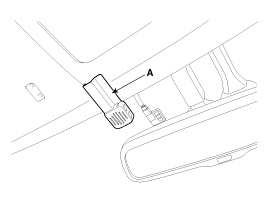
Remove the auto defogging sensor cover (A) by pulling it out.
|
| 3. |
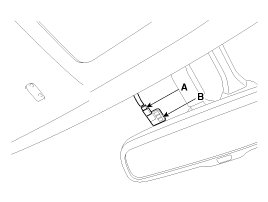
Disconnect the connector (A) and then remove the auto defogging sensor
(B).
|
| 4. |
Install in the reverse order of removal.
|
 Auto Defogging Sensor Description and operation
Description
The auto defogging sensor is installed on the front window glass. The sensor
judges and sends signal if moisture occurs to blow out wind for defogging. The
air condit ...
 Cluster Ionizer Description and operation
Description
The cluster ionizer makes disinfection and decomposition of bad smell from the
air-conditioner or inflow air. And it cleans the inside air of a vehicle.
When runni ...
Other information:
Kia Cee'd JD Service Manual: Components and components location
Components
1. Front seat belt
2. Height adjuster
3. Rear seat belt
4. Rear center seat belt
5. Rear seat belt buckle [LH]
6. Rear seat belt buckle [RH]
...
: Programming the Garage Door Opener to Your Garage Door Opener Motor
Press the learn button on the garage
door opener motor, you have 30
seconds to complete the next two
steps.
Return to your vehicle.
Press and hold one of the three
HomeLink function buttons you want
to program for two seconds, then
release. Repeat this step. Depending
on your brand of ...
© 2017-2026 www.kceed.com
