
Kia Cee'd: Lighting control / High - beam operation
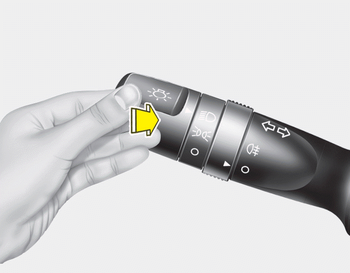
1. Turn the light switch to the headlight position.
2. Push the lever away from you.
- The high-beam indicator will light when the headlight high beams are switched on.
- To prevent the battery from being discharged, do not leave the lights on for a prolonged time while the engine is not running.
WARNING
Do not use high beam when there are other vehicles. Using high beam could obstruct the other driver's vision.
 Auto light/AFLS position
When the light switch is in the AUTO light
position, the taillights and headlights will
be turned ON or OFF automatically
depending on the amount of light outside
the vehicle.
If your vehic ...
 Flashing headlights
Pull the lever towards you. It will return to
the normal position when released. The
headlight switch does not need to be on
to use this flashing feature. ...
Other information:
: Connecting the Vehicle to a Mobile Network. Connecting the Vehicle to a Wi-Fi Network
Connecting the Vehicle to a Mobile Network
What Is the Modem
The modem allows access to a
range of features built into your
vehicle.
Enabling and Disabling the Modem
Press Settings.
Press FordPass Connect.
Press Connectivity Settings.
Switch connectivity features on or off.
Connecting FordP ...
Kia Cee'd JD Service Manual: Special service tools
Special Service Tools
Tools
(Number and Name)
Illustration
Use
09411-1P000
Clutch disc guide
Installation of the clutch disc.
...
