
Kia Cee'd: Gauges / Tachometer
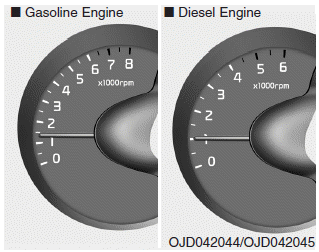
The tachometer indicates the engine speed in revolutions per minute (rpm).
Use the tachometer to select the correct shift points and to prevent lugging and/or over-revving the engine.
CAUTION
Do not operate the engine within the tachometer's RED ZONE. This may cause severe engine damage.
 Gauges
...
 Speedometer
■ Type A
■ Type B • km/h
■ Type B • MPH
■ Type C • km/h
■ Type C • MPH
The speedometer indicates the vehicle
speed.
The speedometer is calibrated in kilometers
pe ...
Other information:
: Charge Preferences
Touch the button to access Charge Time
and Departure Time settings. Once set up,
additional information and settings are
displayed on the charge settings screen.
Charge Times On and Off Switch
This switch is visible when your vehicle is
at a saved Charge Times location. Use the
switch to turn y ...
: Fastening the Seatbelts
Insert the belt tongue into the proper
buckle, the buckle closest to the
direction the tongue is coming from,
until it engages.Note: Make sure that the seatbelt tongue
is properly fastened in the seatbelt buckle.
Press the button to release the seatbelt
tongue.
When in use, place th ...
