
Kia Cee'd: Features of your vehicle / Instrument cluster (Super vision)
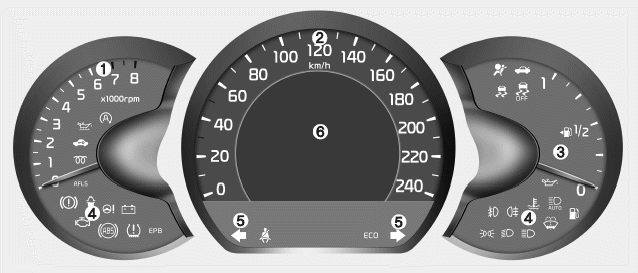
■ Type A
1. Tachometer
2. Speedometer
3. Fuel gauge
4.Warning and indicator lights (if equipped)
5. Turn signal indicators
6. LCD display
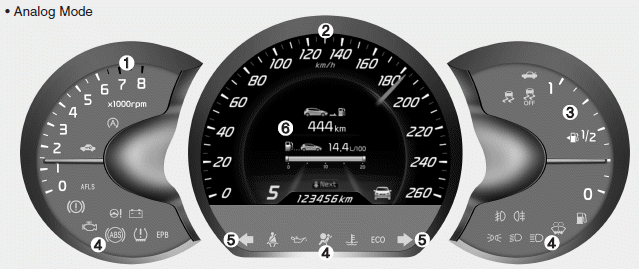
■ Type B (for T-GDI engine) • Analog Mode
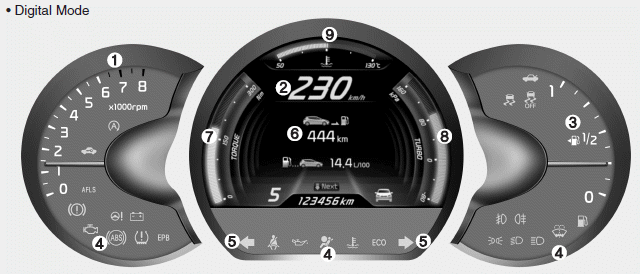
■ Type B (for T-GDI engine) • Digital Mode
1. Tachometer
2. Speedometer
3. Fuel gauge
4.Warning and indicator lights (if equipped)
5. Turn signal indicators
6. LCD display
7. Engine torque gauge
8. Turbo boost pressure gauge
9. Engine coolant temperature gauge
- Instrument panel illumination
- Gauges
- Manual transaxle shift indicator
- Automatic transaxle shift position indicator
- Dual clutch transmission (DS mode) shift indicator
- Speed limiter indicator
- Odometer (km or mi.)
- Trip computer
- LCD display information
- Warnings and indicators (Instrument cluster)
 User Settings
In this mode there are 3 kinds of the submenu.
WARNING
Do not adjust the User Setting
while driving. You may lose your
steering control and cause severe
personal injury or accidents.
1. S ...
 Instrument panel illumination
The instrument panel illumination intensity
can be adjusted as follows:
Ignition switch in the ON position
Pressing the upper or lower part of the
switch
The illumination intensity is ...
Other information:
: Entering a Perpendicular Parking Space. Exiting a Parking Space
Entering a Perpendicular Parking Space
Press the active park assist button.Note: Active park assist
does not recognize
parking space lines and centers your vehicle
between objects.
Press the active park assist icon on the
touchscreen.
Select perpendicular parking.
Use the turn signal lever ...
Kia Cee'd JD Service Manual: Electronic Parking Brake (EPB) Description and operation
Description
The EPB is an electronic parking brake.
The EPB is different from existing parking systems which operated with the brake
pedal or the lever type. The EPB system sends the signal to the ECU when a driver
operates the EPB switch. The ECU operates the EPB actuato ...
