
Kia Cee'd: LCD display information / Parking assist warning
Kia Cee'd JD Owners Manual / Features of your vehicle / Instrument cluster (Super vision) / LCD display information / Parking assist warning
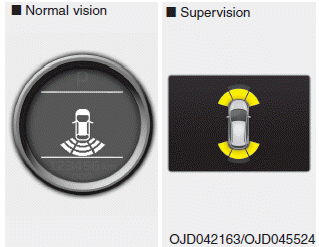
Displays the area an obstacle is detected while moving forward or rearward.
For more details, refer to “Parking assist system” in chapter 4.
 Turn on "FUSE SWITCH" (mode switch)
The notice appears to inform the driver to
turn on the fuse switch in the instrument
panel under the steering wheel.
For more details, refer to “Fuses” in chapter
7. ...
 Align steering wheel
If you start the engine when the steering
wheel is turned 90 degrees to the left (or
right) after a couple of seconds, “Align
steering wheel” illuminates on the LCD
display for 5 seconds ...
Other information:
Kia Cee'd JD Service Manual: Components and components location
Components
1. Power door mirror
2. Power door mirror switch
3. Power folding mirror switch
...
: Data Privacy
WARNING: Do not connect
wireless plug-in devices to the data link
connector. Unauthorized third parties
could gain access to vehicle data and
impair the performance of safety related
systems. Only allow repair facilities that
follow our service and repair instructions
to connect their equipme ...
© 2017-2026 www.kceed.com
