
Kia Cee'd: BSD (Blind Spot Detection) / LCA (Lane Change Assist) / Operating conditions
To operate:
Press the BSD switch with the Ignition switch in the ON position.
The indicator on the BSD switch will illuminate. When the vehicle speed exceeds 30 km/h (20 mph), the system will be activated.
To cancel:
Press the BSD switch again. The indicator on the switch will go off.
When the system is not used, turn the system off by turning off the switch.
✽ NOTICE
- If the vehicle is turned off then on again, the BSD system returns to the previous state.
- When the system is turned on, the warning light will illuminate for 3 seconds on the outside rearview mirror.
The system will activate when:
1. The system is on.
2. The vehicle speed is above about 30
km/h (20 mph).
3. An oncoming vehicle is detected in the
blind spot area.
First stage alert
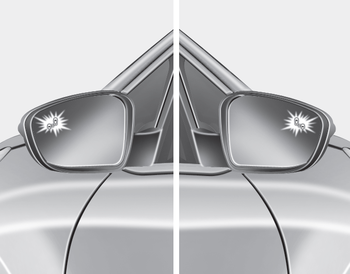
1st stage
If a vehicle is detected within the boundary of the system, an amber warning light will illuminate on the outside rearview mirror.
Once the detected vehicle is no longer within the blind spot area, the warning will turn off according to the driving conditions of the vehicle
Second stage alert
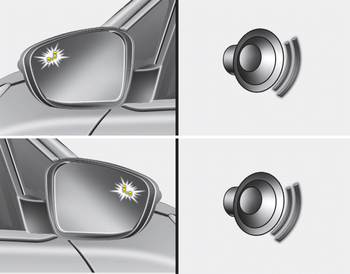
2st stage
A warning chime to alert the driver will activate when:
1. A vehicle has been detected in the blind spot area by the radar system (the warning light will illuminate on the outside rearview mirror) AND
2. The turn signal is applied (same side as where the vehicle is being detected).
When this alert is activated, the warning light on the outside rearview mirror will also blink.
If you turn off the turn signal indicator, the warning chime will be deactivated.
- The second stage alarm can be deactivated.
- To activate the alarm:
Go to the User Settings Mode → Sound and select "BSD" on the LCD display. - To deactivate the alarm:
Go to the User Settings Mode → Sound and deselect "BSD" on the LCD display.
CAUTION
The alarm function helps alert the driver. Deactivate this function only when it is necessary

 Non-operating condition
The sensors are located inside of the
rear bumper.
Always keep the rear bumper clean for
the system to work properly.
WARNING
The warning light on the outside
rearview mirror will illum ...
Other information:
Kia Cee'd JD Owners Manual: Infant or small child
You should be aware of the specific
requirements in your country. Child
and/or infant seats must be properly
placed and installed in the rear seat. For
more information about the use of these
restraints, refer to “Child restraint system”
in this section.
WARNING
Every person in you ...
Kia Cee'd JD Service Manual: Drive Belt Tensioner Repair procedures
Removal and Installation
1.
Remove the drive belt.
(Refer to Timing System - "Dreve Belt")
2.
Remove the alternator.
(Refer to Engine Electrical System - "Alternator")
3.
...
