
Kia Cee'd: BSD (Blind Spot Detection) / LCA (Lane Change Assist) / Non-operating condition
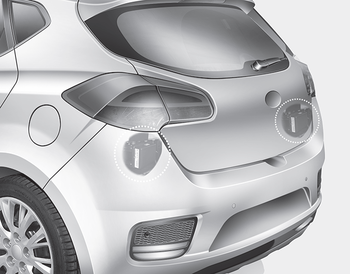
The sensors are located inside of the rear bumper.
Always keep the rear bumper clean for the system to work properly.
WARNING
- The warning light on the outside rearview mirror will illuminate whenever a vehicle is detected at the rear side by the system. To avoid accidents, do not focus only on the warning light and neglect to see the surrounding of the vehicle.
- Drive safely even though the vehicle is equipped with a Blind Spot Detection System (BSD) and Rear Cross Traffic Alert (RCTA). Do not solely rely on the system but check your surrounding before changing lanes or backing the vehicle up. The system may not alert the driver in some conditions so always check your surroundings while driving.
- The Blind Spot Detection System (BSD) and Rear Cross Traffic Alert (RCTA) are not a substitute for proper and safe driving practices. Always drive safely and use caution when changing lanes or backing up your vehicle.The Blind Spot Detection System (BSD) may not detect every object alongside the vehicle.
✽ NOTICE
- The system may not work properly when the bumper has been damaged, or if the rear bumper has been replaced or repaired.
- The sensing range differs somewhat according to the width of the road. When the road is narrow, the system may detect other vehicles in the next lane Or when the road is wide, the system may not detect other vehicles in the next lane.
- The system may turn off due to strong electromagnetic waves.
 Operating conditions
To operate:
Press the BSD switch with the Ignition
switch in the ON position.
The indicator on the BSD switch will illuminate.
When the vehicle speed exceeds 30
km/h (20 mph), the system will ...
 Warning message
• This warning message may appear
when :
- One or both of the sensors on the
rear bumper is blocked by dirt or snow
or a foreign object.
- Driving in rural areas where the BSD
sensor doe ...
Other information:
Kia Cee'd JD Owners Manual: Using USB Mode
Playing/Pausing USB Files
Once a USB is connected, the mode
will automatically start and begin
playing a USB file.
While playing, press the button
to pause and press button to
play.
✽ NOTICE
Loading may require additional
time if there are many files and
folders within the ...
: Route Guidance
Turn indicator. Select to hear the
last voice prompt.
Point of interest.
Estimated time of arrival,
distance to destination or time
to destination.
Current road.
Mute guidance prompts.
Cancel route guidance.
Note: To change guidance prompt volume,
turn the volume control when a guida ...
