
Kia Cee'd: Lighting / Lighting control
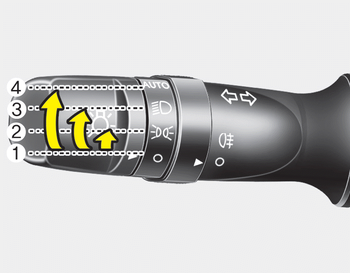
The light switch has a Headlight and a Parking light position.
To operate the lights, turn the knob at the end of the control lever to one of the following positions:
(1) OFF position
(2) Position light position
(3) Headlight position
(4) Auto light position (if equipped)
- Position light position
- Headlight position
- Auto light/AFLS position
- High - beam operation
- Flashing headlights
 Static bending light
While driving the corner, for your sight
and safety, the static bending light turns
on automatically. The system will operate
automatically as follows:
When vehicle speed is under 10km/h
...
 Position light position
When the light switch is in the position
light position, the tail, position, license
and instrument panel lights are ON. ...
Other information:
Kia Cee'd JD Service Manual: Oil Pump Repair procedures
Removal and Installation
1.
Remove the timing chain cover.
(Refer to Timing System - "Timing Chain Cover")
2.
Remove the pump cover (A).
Tightening torque :
8.8 ~ 13.7N.m (0.9 ...
Kia Cee'd JD Service Manual: DC DC Converter Components and components location
Component Location
1. DC/DC converter (LHD)
2. DC/DC converter (RHD)
...
