Kia Cee'd: Interior Trim / Front Pillar Trim Repair procedures
| • |
Put on gloves to protect your hands.
|
|
| • |
Use a plastic panel removal tool to remove interior trim pieces
to protect from marring the surface.
|
| • |
Take care not to bend or scratch the trim and panels.
|
|
| 1. |
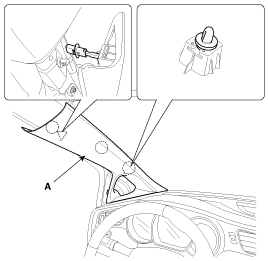
Using a screwdriver or remover, remove the front pillar trim (A).
|
| 2. |
Install in the reverse order of removal.
| •
|
Replace any damaged clips.
|
|
|
Component Location
1. Front pillar trim
...
Component Location
[5Door]
1. Center pillar lower trim
2. Center pillar upper trim
[3Door]
...
Other information:
: Navigation (If Equipped)
Note: For more information, refer to our
website.
Select the navigation option on
the feature bar.
Map view menu.
Zoom out.
Zoom in.
Route guidance menu.
Destination entry menu.
...
: Using Seatbelts
WARNING: Depending on where
you secure a child restraint, and
depending on the child restraint design,
you may block access to certain seatbelt
buckle assemblies and LATCH lower
anchors, rendering those features
potentially unusable. To avoid risk of
injury, make sure occupants only use
seat ...



 Front Pillar Trim Components and components location
 Center Pillar Trim Components and components location