
Kia Cee'd: Audio / Audio Remote Control Repair procedures
| Inspection |
| Type A |
| 1. |
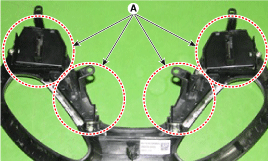
Check the audio remote control switch (A) for resistance between terminals
in each switch position.
[Audio]
[Call + Voice]
[Cruise + Flex]
[Trip]
|
| Type B |
| 1. |
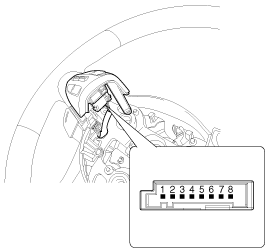
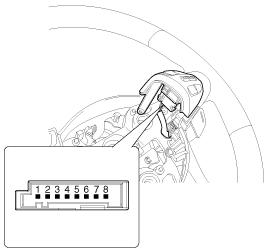
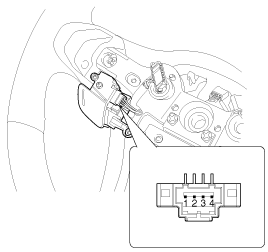
Check the audio remote control switch (A) for resistance between connector
terminals in each switch position.
[Audio/ Bluetooth/ Drive mode]
[Trip + Cruise]
[Voice recognition]
[ECO/ Trip/ Drive mode]
[Audio/ Bluetooth/ Drive mode]
[Trip]
[Voice recogniton]
[ECO/ Trip/ Drive mode]
|

| Removal |
| Type A |
| 1. |
Disconnect the negative (-) battery terminal.
|
| 2. |
Remove the driver airbag module.
(Refer to Restraint - "Driver Airbag (DAB) Module and Clock Spring")
|
| 3. |
Remove the steering wheel.
(Refer to Steering System - "Steering Column and Shaft")
|
| 4. |
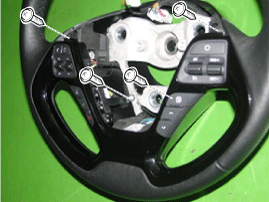
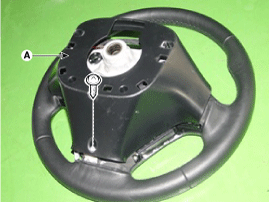
Remove the steering wheel cover (A) after loosening the screws.
|
| 5. |
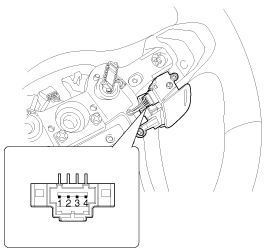
Disconnect the steering wheel remote control switch connector (A).
|
| 6. |
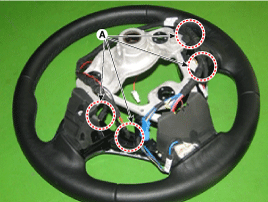
Disengage the steering wheel remote control switch assembly (A).
|
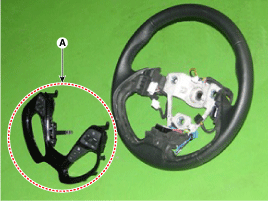
| 7. |
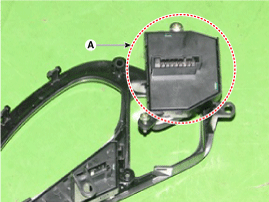
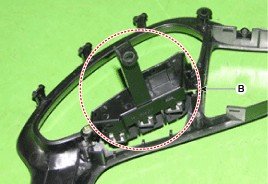
Remove the steering wheel remote control switch (A) and (B) after loosening
screws.
|
| Type B |
| 1. |
Disconnect the negative (-) battery terminal.
|
| 2. |
Remove the driver airbag module.
(Refer to the RT group)
|
| 3. |
Remove the steering wheel.
(Refer to the ST group - "Steering column & shaft")
|
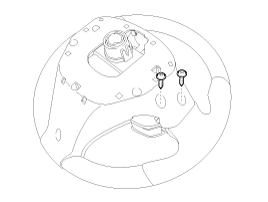
| 4. |
Loosen the mounting screws from the rear steering wheel cover.
|
| 5. |
Separate the upper left steering wheel remote control switch (A) after
loosening the mounting screw.
|
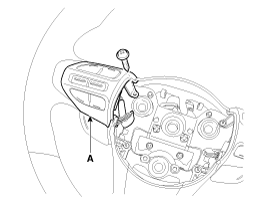
| 6. |
Remove the upper left steering wheel remote control switch (A) after
disconnecting the connector.
|
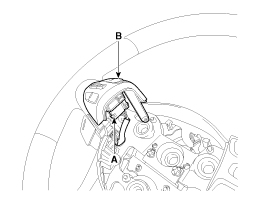
| 1. |
Disconnect the negative (-) battery terminal.
|
| 2. |
Remove the driver airbag module.
(Refer to the RT group)
|
| 3. |
Remove the steering wheel.
(Refer to the ST group - "Steering column & shaft")
|
| 4. |
Loosen the mounting screws from the front steering wheel cover.
|
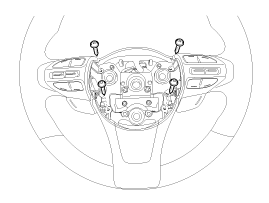
| 5. |
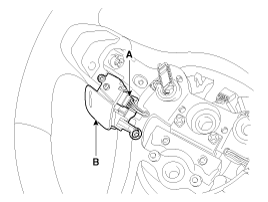
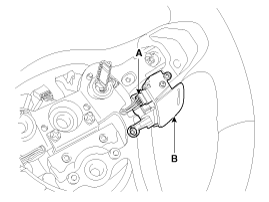
Remover the upper left steering wheel cover (A) after loosening the
mounting screws.
|
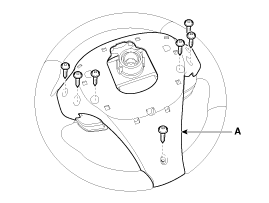
| 6. |
Separate the upper steering wheel remote control switch (A) after loosening
the mounting screw.
[LH]
[RH]
|
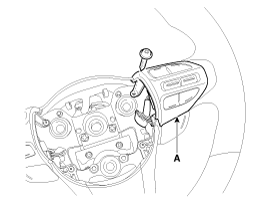
| 7. |
Remove the upper steering wheel remote control switch (A) after disconnecting
the connector.
[LH]
[RH]
|
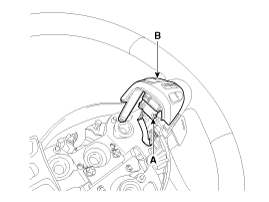
| 8. |
Remove the steering wheel cover (A) after loosening the mounting screws
from the front steering wheel cover.
|
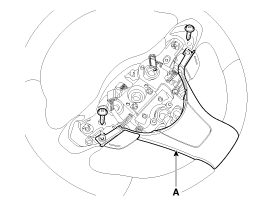
| 9. |
Remove the front steering wheel cover (B) after disconnecting the connector
(A).
|
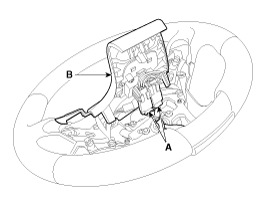
| 10. |
Remove the lower steering wheel remote control switch (B) after disconnecting
the connector (A).
[LH]
[RH]
|
| Installation |
| Type A |
| 1. |
Reassemble the steering wheel remote control switch after connecting
the connector.
|
| 2. |
Reassemble the steering wheel.
|
| 3. |
Reassemble the driver airbag module.
|

| Type B |
| 1. |
Install the upper left steering wheel remote control switch and rear
steering wheel cover.
|
| 2. |
Install the steering wheel.
|
| 3. |
Reconnect the remote control switch connector and airbag connectors.
|
| 4. |
Install the driver airbag module.
|
| 5. |
Connect the negative (-) battery terminal.
|
| 1. |
Install the lower/ upper steering wheel remote control switch and front/
rear steering wheel cover.
|
| 2. |
Install the steering wheel.
|
| 3. |
Reconnect the remote control switch connector and airbag connectors.
|
| 4. |
Install the driver airbag module.
|
| 5. |
Connect the negative (-) battery terminal.
|
 Audio Remote Control Schematic diagrams
Circuit Diagram
Type A
1. Remote control switch(LH:
Audio)
2. Remote control switch(RH: Cruise+Flex)
3. Bluetooth hands free switch
...
 Multimedia Jack Schematic diagrams
Circuit Diagram
No
Terminal Description
Condition
Specified Condition
1
USB /iPod power
...
Other information:
Kia Cee'd JD Owners Manual: Closing the sunroof
To close the sunroof glass with the
sunshade
Push the sunroof control lever forward or
full it down.
The sunroof glass will close.
Then to close sunshade
- Press the sunshade control switch(2).
- Push the sunroof control lever forward
or full it down
To stop the sunroof movement at any
...
: Checking the Tire Pressures. Inflating the Tires
Checking the Tire Pressures
Safe operation of your vehicle
requires that your tires are
properly inflated. Remember that
a tire can lose up to half of its air
pressure without appearing flat.
Every day before you drive, check
your tires. If one looks lower than
the others, use a tire gauge to ...
