
Kia Cee'd: Back View Camera System / Repair procedures
| Removal |
| 1. |
Disconnect the negative (-) battery terminal.
|
| 2. |
Open the tailgate and remove the tailgate trim.
(Refer to Body - "Tailgate Trim")
|
| 3. |
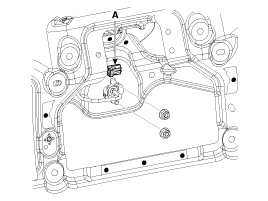
Disconnect the back view camera connector (A) and the remove 2 nuts.
|
| 4. |
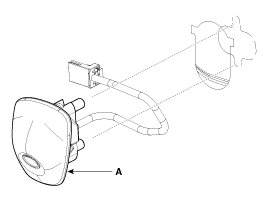
Remove the back view camera (A).
|
| Installation |
| 1. |
Install the back view camera and connect the connector.
|
| 2. |
Install the tailgate trim.
|
 Description and operation
Description
To provide the driver the rear of the vehicle, the backview camera receives
the vehicle rearview image signal and displays the image on the AV head unit
monitor or on ...

Other information:
Kia Cee'd JD Owners Manual: Engine coolant temperature gauge
This gauge shows the temperature of the
engine coolant when the ignition switch
is ON.
Do not continue driving with an overheated
engine. If your vehicle overheats, refer
to “If the engine overheats” in chapter 6.
CAUTION
If the gauge pointer moves beyond
the normal range area tow ...
Kia Cee'd JD Service Manual: Intake Actuator Repair procedures
Inspection
1.
Turn the ignition switch OFF.
2.
Disconnect the intake actuator connector.
3.
Verify that the intake actuator operates to the fresh position when
connecting 12V to terminal 4 and groundi ...
© 2017-2026 www.kceed.com
