
Kia Cee'd: BSD (Blind Spot Detection) / LCA (Lane Change Assist) / Warning message
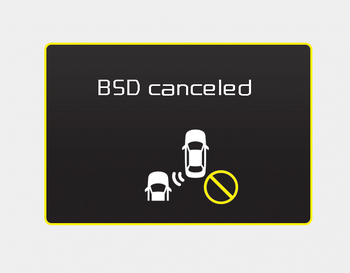
• This warning message may appear when :
- One or both of the sensors on the
rear bumper is blocked by dirt or snow
or a foreign object.
- Driving in rural areas where the BSD
sensor does not detect another vehicle
for an extended period of time.
- When there is inclement weather
such as heavy snow or rain.
- A trailer or carrier is installed. (To use
the BSD system, remove the trailer or
carrier from your vehicle.)
If any of these conditions occur, the light on the BSD switch and the system will turn off automatically.
When the BSD canceled warning message is displayed in the cluster, check to make sure that the rear bumper is free from any dirt or snow in the areas where the sensor is located. Remove any dirt, snow, or foreign material that could interfere with the radar sensors.
After any dirt or debris is removed, the BSD system should operate normally after about 10 minutes of driving the vehicle.
If the system still does not operate normally have your vehicle inspected by an authorized Kia dealer.
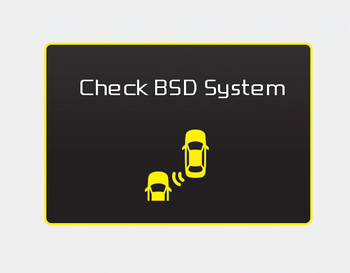
If there is a problem with the BSD system, a warning message will appear and the light on the switch will turn off. The system will turn off automatically.We recommend that you have your vehicle inspected by an authorized Kia dealer.
 Non-operating condition
The sensors are located inside of the
rear bumper.
Always keep the rear bumper clean for
the system to work properly.
WARNING
The warning light on the outside
rearview mirror will illum ...
 RCTA (Rear cross traffic alert)
The Rear Cross Traffic Alert feature monitors
approaching cross traffic from the
left and right side of the vehicle when
your vehicle is in reverse. ...
Other information:
Kia Cee'd JD Owners Manual: Operating condition
This system will activate when the indicator
on the rear parking assist OFF
button is not illuminated.
If you desire to deactivate the rear
parking assist system, press the rear
parking assist OFF button again. (The
indicator on the button will illuminate.)
To turn the syste ...
Kia Cee'd JD Owners Manual: Manual heating and air conditioning
The heating and cooling system can be
controlled manually by pressing buttons
or turning knob(s) other than the AUTO
button. In this case, the system works
sequentially according to the order of
buttons or knob(s) selected.
1. Start the engine.
2. Set the mode to the desired position.
...
