
Kia Cee'd: Blind Spot Detection system (BSD) / RCTA (Rear cross traffic alert)
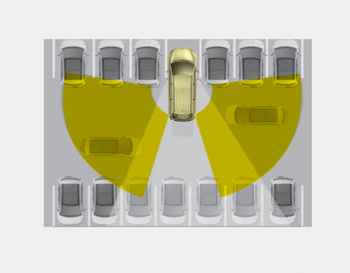
The Rear Cross Traffic Alert feature monitors approaching cross traffic from the left and right side of the vehicle when your vehicle is in reverse.
 Warning message
• This warning message may appear
when :
- One or both of the sensors on the
rear bumper is blocked by dirt or snow
or a foreign object.
- Driving in rural areas where the BSD
sensor doe ...
 Operating conditions
Select RCTA (Rear Cross Traffic Alert)
in "User Settings" under "Driving Assist"
on the instrument cluster. The system
will turn on and stand by to be activated.
Select RCTA again, to ...
Other information:
Kia Cee'd JD Owners Manual: Weight of the trailer
What is the maximum safe weight of a
trailer? It should never weigh more than
the maximum trailer weight with trailer
brakes. But even that can be too heavy.
It depends on how you plan to use your
trailer. For example, speed, altitude, road
grades, outside temperature and how
often yo ...
Kia Cee'd JD Owners Manual: Starting the gasoline engine
1.Make sure the parking brake is
applied.
2.Manual Transaxle - Depress the
clutch pedal fully and shift the
transaxle into Neutral. Keep the clutch
pedal and brake pedal depressed
while turning the ignition switch to the
start position.
Automatic Transaxle/DCT* - Place
the transaxle ...
