
Kia Cee'd: Rear Suspension System / Rear Shock Absorber Repair procedures
Kia Cee'd JD Service Manual / Suspension System / Rear Suspension System / Rear Shock Absorber Repair procedures
| Replacement |
| 1. |
Loosen the wheel nuts slightly.Raise the vehicle, and make sure it is
securely supported.
|
| 2. |
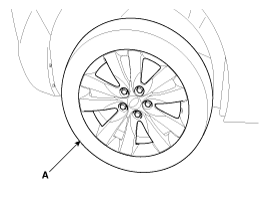
Remove the rear wheel and tire (A) from rear hub.
|

| 3. |
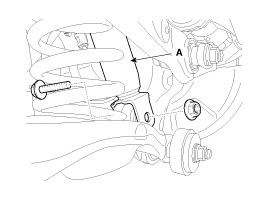
Loosen the bolt & nut and then disconnect the shock absorber (A) from
the rear axle.
|
| 4. |
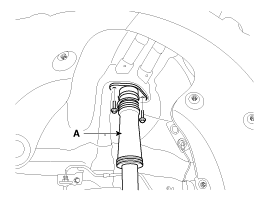
Loosen the mounting bolts and then remove the shock absorber (A).
|
| 5. |
Install in the reverse order of removal.
|
| Inspection |
| 1. |
Check the rubber parts for wear and deterioration.
|
| 2. |
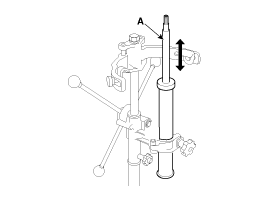
Compress and extend the piston rod (A) and check that there is no abnormal
resistance or unusual sound during operation.
|
Disposal
| 1. |
Fully extend the piston rod.
|
| 2. |
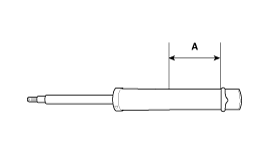
Drill a hole on the (A) section to remove gas from the cylinder.
|
 Rear Shock Absorber Components and components location
Components
1. Rear insulator cover
2. Locking nut
3. Plpe
4. Rear bracket assembly
5. Bumper rubber
6. Protector
7. Rear shock absorber as ...
 Rear Upper Arm Repair procedures
Replacement
1.
Loosen the wheel nuts slightly.
Raise the vehicle, and make sure it is securely supported.
2.
Remove the rear wh ...
Other information:
Kia Cee'd JD Owners Manual: Shift lock system
For your safety, the Dual clutch transmission
has a shift lock system which prevents
shifting the transaxle from P (Park)
or N (Neutral) into R (Reverse) unless
the brake pedal is depressed.
To shift the transaxle from P (Park) or N
(Neutral) into R (Reverse):
1. Depress and hold the bra ...
Kia Cee'd JD Service Manual: Cluster Ionizer Description and operation
Description
The cluster ionizer makes disinfection and decomposition of bad smell from the
air-conditioner or inflow air. And it cleans the inside air of a vehicle.
When running an air-conditioner or heater, it starts with "CLEAN" mode and repeats
from "CLE ...
© 2017-2026 www.kceed.com
