
Kia Cee'd: Trip computer / Instant fuel economy (L/100 km or MPG)
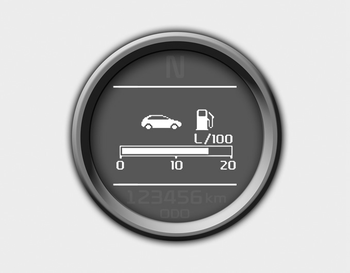
This mode calculates the instant fuel consumption during the last few seconds.
✽ NOTICE
- If the vehicle is not on level ground or the battery power has been interrupted, the “Distance to empty” function may not operate correctly. The trip computer may not register additional fuel if less than 6 liters (1.6 gallons) of fuel are added to the vehicle.
- The fuel economy and distance to empty may vary significantly based on driving conditions, driving habits, and condition of the vehicle.
- The distance to empty is an estimate of the available driving distance. This value may differ from the actual driving distance.
 Average fuel economy (L/100 km or MPG)
This mode calculates the average fuel
consumption from the total fuel used and
the distance since the last average fuel
economy reset. The total fuel used is calculated
from the fuel consump ...
 Average speed (km/h or MPH)
This mode calculates the average speed
of the vehicle since the last average
speed reset.
Even if the vehicle is not in motion, the
average speed keeps going while the
engine is running.
P ...
Other information:
: Active Park Assist – Troubleshooting
Active Park Assist – Information Messages
Active Park Assist – Frequently Asked Questions
Why does active park assist not operate correctly?
The system is unable to detect a
vehicle, curb or object to park next to
or in between. The system needs
boundary objects to operate correctly.
Why doe ...
: Federal Highway Administration Regulation
Regulations such as those issued by the
Federal Highway Administration or issued
pursuant to the Occupational Safety and
Health Act (OSHA), and state and local
laws and regulations may require
additional equipment for the way you
intend to use your vehicle. It is the
responsibility of the reg ...
