
Kia Cee'd: Trip computer / Average speed (km/h or MPH)
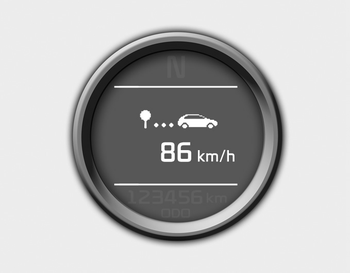
This mode calculates the average speed of the vehicle since the last average speed reset.
Even if the vehicle is not in motion, the average speed keeps going while the engine is running.
Pressing the  button for more
than 1
second, when the average speed is displayed,
clears the average speed to zero
(---).
button for more
than 1
second, when the average speed is displayed,
clears the average speed to zero
(---).
 Instant fuel economy (L/100 km or MPG)
This mode calculates the instant fuel consumption
during the last few seconds.
✽ NOTICE
If the vehicle is not on level ground or
the battery power has been interrupted,
the “Distanc ...
 Elapsed time
This mode indicates the total time traveled
since the last driving time reset.
Even if the vehicle is not in motion, the
driving time keeps going while the engine
is running.
The meter’s w ...
Other information:
: Seatbelt Reminder
How Does the Seatbelt Reminder Work
WARNING: The system will only
provide protection when you use the
seatbelt correctly.
This system monitors all seating positions
and provides audio and graphic feedback.
Seatbelt Reminder Indicators
This lamp illuminates if you do
not fasten your seatbelt whe ...
: Locating the Fuel Filler Funnel. Running Out of Fuel
Locating the Fuel Filler Funnel
The fuel filler funnel is under the luggage
compartment floor covering.
Running Out of Fuel
Filling a Portable Fuel Container
WARNING: Flow of fuel through a
fuel pump nozzle can produce static
electricity. This can cause a fire if you are
filling an ungrounded fu ...
