
Kia Cee'd: Manual climate control system / Heating and air conditioning
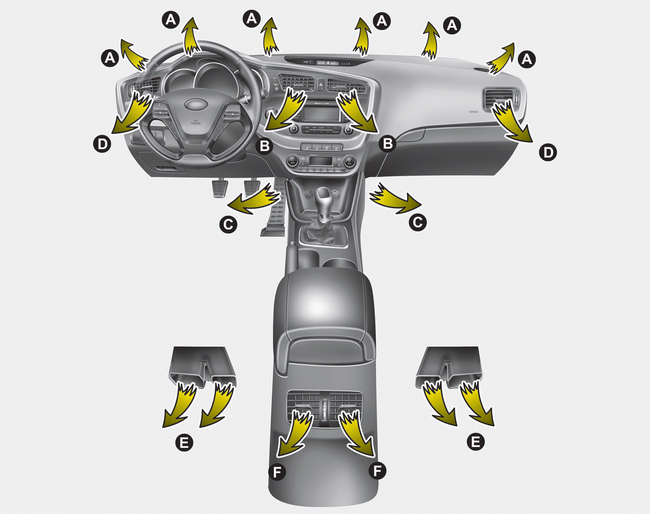
1. Start the engine.
2. Set the mode to the desired position.
To improve the effectiveness of heating
and cooling:
- Heating: 
- Cooling: 
3. Set the temperature control to the desired position.
4. Set the air intake control to the outside (fresh) air or recirculated position.
5. Set the fan speed control to the desired speed.
6. If air conditioning is desired, turn the air conditioning system on.
- Mode selection
- Temperature control
- Air intake control
- Fan speed control
- To turn off the blowers
- Air conditioning
 Manual climate control system
1. Fan speed control knob
2. Air conditioning button
3. Rear window defroster button
4. Mode selection knob
5. Air intake control button
6. Temperature control knob
CAUTION
Operating the blow ...
 Mode selection
The mode selection knob controls the
direction of the air flow through the ventilation
system.
Air can be directed to the floor, dashboard
outlets, or windshield. Six symbols
are used to re ...
Other information:
Kia Cee'd JD Service Manual: Components and components location
Component Location
1. Rear defogger relay (Built-in
smart junction box)
2. Windshield deicer switch (Rear defogger switch)
3. Windshield deicer
4. Deicer connector
...
Kia Cee'd JD Owners Manual: Side impact air bag
Your vehicle is equipped with a side
impact air bag in each front seat. The
purpose of the air bag is to provide the
vehicle's driver and/or the front passenger
with additional protection than that
offered by the seat belt alone. The side
impact air bags are designed to deploy
only ...
