
Kia Cee'd: Cooling System / Cooling Fan Repair procedures
Kia Cee'd JD Service Manual / Engine Mechanical System / Cooling System / Cooling Fan Repair procedures
| Removal and Installation |
| 1. |
Disconnect the battery negative terminal.
|
| 2. |
Remove the air cleaner assembly.
(Refer to Intake and exhaust system - "Air Cleaner")
|
| 3. |
Remove the battery tray.
(Refer to Engine Electrical System - "Battery")
|
| 4. |
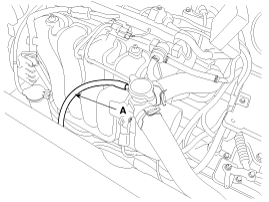
Disconnect the over flow hose (A) from the radiator.
|
| 5. |
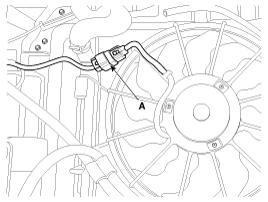
Disconnect the fan motor connector (A).
|
| 6. |
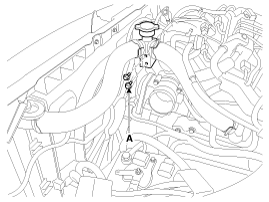
Remove the filler neck assembly bolts(A).
|
| 7. |
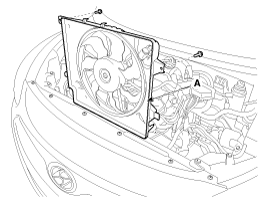
Remove the cooling fan assembly(A).
|
| 8. |
Installation is in the reverse order of removal.
|
 Cooling Fan Components and components location
Components
1. Cooling fan
2. Fan motor
3. Fan shroud
...
 Water Temperature Control Assembly Components and components location
Components
1. Water temperature control
assembly
2. Water temperature sensor
3. Gasket
4. Water
5. Bypass hose
...
Other information:
Kia Cee'd JD Service Manual: Specifications
Specification
Item
Type
Watt (W)
Head lamp
Low
H7
55
D1S
35
High
H7
55
Smart Cornering
...
Kia Cee'd JD Owners Manual: Fuel filter warning light
(Diesel engine)
This warning light illuminates for 3 seconds
after the ignition switch is set to the
ON position and then it will go out. If it
lights up while the engine is running, it
indicates that water has accumulated
inside the fuel filter. If this happens,
remove the water from the fuel filter. ...
© 2017-2026 www.kceed.com
