
Kia Cee'd: Engine Control System / Accelerator Position Sensor (APS) Repair procedures
Kia Cee'd JD Service Manual / Fuel System / Engine Control System / Accelerator Position Sensor (APS) Repair procedures
| Inspection |
| 1. |
Connect the GDS on the Data Link Connector (DLC).
|
| 2. |
Turn the ignition switch ON.
|
| 3. |
Measure the output voltage of the APS 1 and 2 at C.T and W.O.T.
|
| Removal |
| 1. |
Turn the ignition switch OFF and disconnect the negative (-) battery
cable.
|
| 2. |
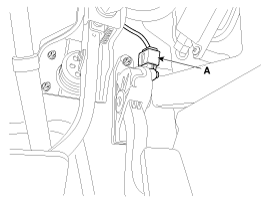
Disconnect the accelerator position sensor connector (A).
|
| 3. |
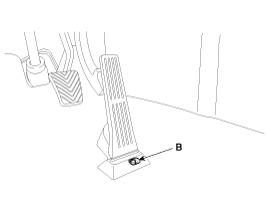
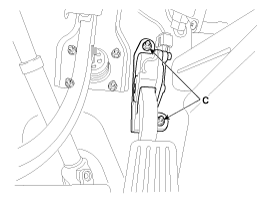
Remove the installation bolt (B) and nuts (C), and then remove the accelerator
pedal module.
|
| Installation |
| 1. |
Installation is reverse of removal.
|
 Accelerator Position Sensor (APS) Schematic diagrams
Circuit Diagram
...
 Injector Description and operation
Description
The GDI injector is similar to a standard injector, but sprays fuel at a much
higher pressure directly into the combustion chamber and has a swirl disc to
get the fue ...
Other information:
: Settings
Press the button to enter the
settings menu.
Once you select a tile, press
the
button next to a menu item to
view an explanation of the
feature or setting.
Sound
Select this tile to adjust the sound settings.
Clock
Select this tile to adjust the clock settings.
Bluetooth
Select this tile to s ...
: Using SYNC™ With Your Media Player
SYNC supports digital media sources
including: iPod, Bluetooth devices, and
most USB drives. SYNC also supports
audio formats, such as MP3, WMA, WAV
and ACC.
Media Sources
The AUX or MEDIA button allows you to
view and select available media sources.
Press the AUX or MEDIA button to view
your ...
© 2017-2026 www.kceed.com
