
Kia Cee'd: Features of your vehicle / Wipers and washers
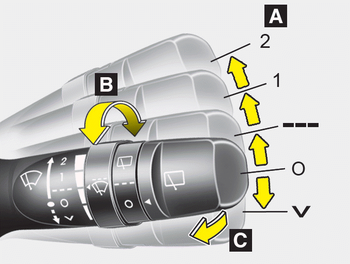
■ Front
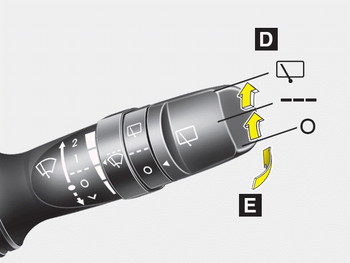
■ Rear
A :Wiper speed control (front)
· 2 – High wiper speed
· 1 – Low wiper speed
· --- – Intermittent wipe
· AUTO* – Automatic control wipe
· O – Off
· – Single wipe
B : Intermittent control wipe time adjustment
C :Wash with brief wipes (front)*
D : Rear wiper/washer control*
· – Continuous wipe
· --- – Intermittent wipe
· O – Off
E :Wash with brief wipes (rear)*
 Adaptive Front Lighting System
(AFLS)
Adaptive Front Lighting System
(AFLS)
Adaptive front lighting system uses the
steering angle and vehicle speed, to
keep your field of vision wide by swiveling
and leveling the headlamp.
Change the switch to the AUTO position
wh ...
 Windshield wipers (front)
Operates as follows when the ignition
switch is turned ON.
: For a single wiping cycle, move
the
lever to this position and release it.
The wipers will operate continuously if
the lever is ...
Other information:
Kia Cee'd JD Owners Manual: Headrest
The rear seat is equipped with headrests
in all the seating positions for the occupant's
safety and comfort.
The headrest not only provides comfort
for passengers, but also helps protect the
head and neck in the event of a collision.
WARNING
For maximum effectiveness in
case of an ...
: Connecting a Trailer Precautions
WARNING: Do not adjust the spring
bars so that your vehicle's rear bumper
is higher than before attaching the trailer.
Doing so will defeat the function of the
weight-distributing hitch, which may
cause unpredictable handling, and could
result in serious personal injury.
Do not tow a trailer u ...
