
Kia Cee'd: Operation of the rear parking assist system / Type of the warning indicator
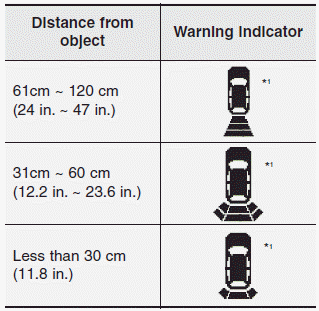
❈ In case the object is between or close to the sensors, the indicator could be different.
 Types of warning sound
When an object is 120 cm to 61 cm (47
in. to 23.6 in.) from the rear bumper:
Buzzer beeps intermittently
When an object is 60 cm to 31 cm
(23.6 in. to 12.2 in.) from the rear
bumper: ...
 Non-operational conditions of
rear parking assist system
Non-operational conditions of
rear parking assist system
The rear parking assist system may
not operate properly when:
1. Moisture is frozen to the sensor. (It will
operate normally when the moisture
has been cleared.)
2. The sensor is covered with ...
Other information:
: Under Hood Overview - 1.5L EcoBoost™
Windshield washer fluid. See Adding Washer Fluid.
Engine coolant reservoir. See Checking the Coolant.
Engine oil dipstick. See Engine Oil Dipstick Overview.
Engine oil filler cap. See Adding Engine Oil.
Brake fluid reservoir. See Locating the Brake Fluid Reservoir.
Battery. See Changing the ...
Kia Cee'd JD Service Manual: Engine Coolant Temperature Sensor (ECTS) Description and operation
Description
Engine Coolant Temperature Sensor (ECTS) is located in the engine coolant passage
of the cylinder head for detecting the engine coolant temperature. The ECTS
uses a thermistor that changes resistance with the temperature.
The electrical resistance of the ECTS d ...
