
Kia Cee'd: Starting System / Starter Components and components location
Kia Cee'd JD Service Manual / Engine Electrical System / Starting System / Starter Components and components location
| Components |
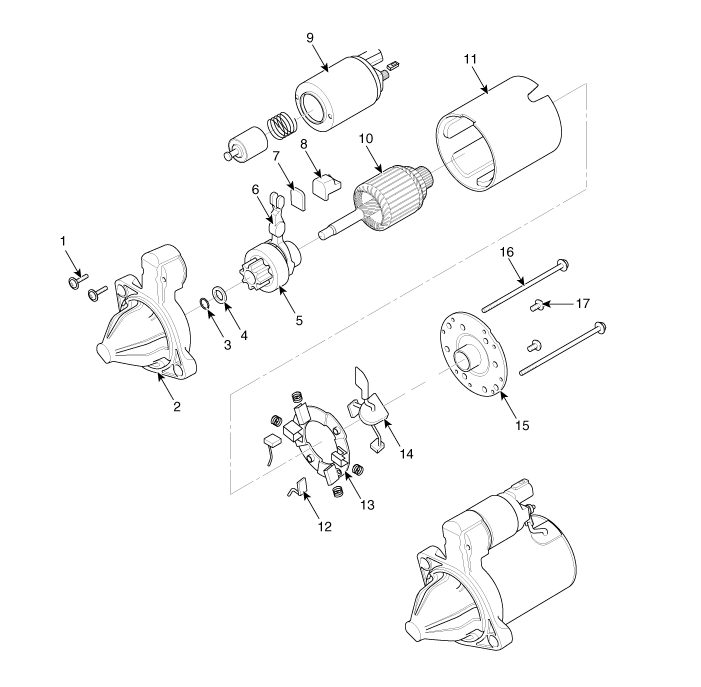
| 1. Screw
2. Front housing 3. Stop ring 4. Stopper 5. Overunn clutch 6. Lever 7. Lever plate 8. Lever packing 9. Magnet switch assembly |
10. Armature
assembly 11. Yoke assembly 12. Brush (-) 13. Brush holder 14. Brush (+) 15. Rear bracket 16. Through bolt 17. Screw |
 Starter Specifications
Specification
Starter [Non-ISG type]
Item
Specification
Rated voltage
12 V, 1.2 kW
The number of pini ...
 Starter Schematic diagrams
Circuit Diagram
...
Other information:
Kia Cee'd JD Service Manual: Rear Seat Cushion Cover Components and components location
Component Location
1. Rear seat cushion cover [LH]
2. Rear seat cushion cover [RH]
...
Kia Cee'd JD Service Manual: Air Cleaner Components and components location
Components
1. Air intake hose
2. Air cleaner cover
3. Air cleaner filter
4. Air cleaner body
5. Resonator
6. Air duct
...
© 2017-2026 www.kceed.com
