
Kia Cee'd: SRSCM / Side Impact Sensor (SIS) Repair procedures
| Removal |
Side Impact Sensor
| 1. |
Disconnect the battery negative cable and wait for at least three minutes
before beginning work.
|
| 2. |
Remove the door scuff trim.
(Refer to Body - "Door scuff trim")
|
| 3. |
Remove the center pillar lower trim.
(Refer to Body - "Center pillar trim")
|
| 4. |
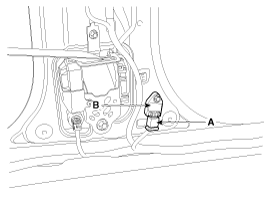
Disconnect the side impact sensor connector (A).
|
| 5. |
Loosen the side impact sensor mounting bolt and remove the side impact
sensor (B).
|
| Installation |
Side Impact Sensor
|

| 1. |
Install the new side impact sensor with the bolt then connect the side
impact sensor connector.
|
| 2. |
Install the center pillar lower trim.
(Refer to Body - "Center pillar trim")
|
| 3. |
Install the door scuff trim.
(Refer to Body - "Door scuff trim")
|
| 4. |
Reconnect the battery negative cable.
|
| 5. |
After installing the Side Impact Sensor, confirm proper system operation:
|
 Side Impact Sensor (SIS) Components and components location
Components
...
 PAB ON/OFF Switch Description and operation
Description
Driver can control the passenger airbag operating Condition (Enable or Disable)
by using this PAB ON/OFF switch.
Passenger Airbag (PAB) ON/OFF Switch is installed i ...
Other information:
Kia Cee'd JD Owners Manual: Closing the fuel filler lid
1. To install the cap, turn it clockwise until
it “clicks”. This indicates that the cap is
securely tightened.
2. To close the lid, press the edge of the
lid. Make sure it is securely closed.
WARNING - Refueling
If pressurized fuel sprays out, it
can cover your clothes or skin
...
Kia Cee'd JD Service Manual: Knock Sensor (KS) Specifications
Specification
Item
Specification
Capacitance (pF)
950 ~ 1,350
Resistance (MΩ)
4.87
...
© 2017-2026 www.kceed.com
