
Kia Cee'd: Back View Camera System / Schematic diagrams
| Circuit Diagram |
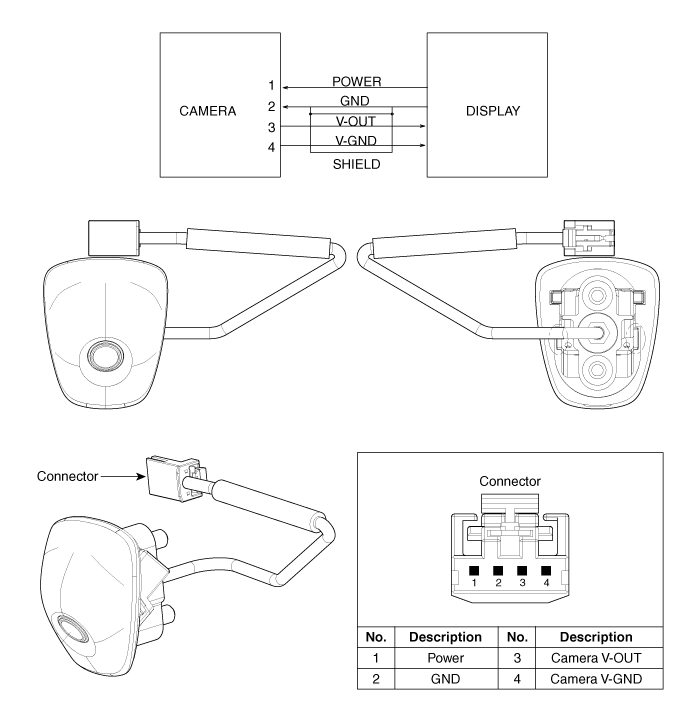
 Components and components location
Component Location
1. Back view camera
2. Inside mirror with rear camera display
3. A/V or Audio head unit monitor
...
 Description and operation
Description
To provide the driver the rear of the vehicle, the backview camera receives
the vehicle rearview image signal and displays the image on the AV head unit
monitor or on ...
Other information:
Kia Cee'd JD Service Manual: Electronic Parking Brake (EPB) Components and components location
Components
1. EPB Unit
2. EPB Switch
3. Brake Caliper
4. EPB Warning Lamp
...
Kia Cee'd JD Owners Manual: Driver’s Attention
The driver must be cautious in the below
situations, because the system may not
detect other vehicles or objects in certain
circumstances.
The vehicle drives on a curved road or
through a tollgate.
The vehicle is turning left or right at a
crossroad.
The sensor is polluted with r ...
© 2017-2026 www.kceed.com
