
Kia Cee'd: Electric parking brake (EPB) / Releasing the parking brake
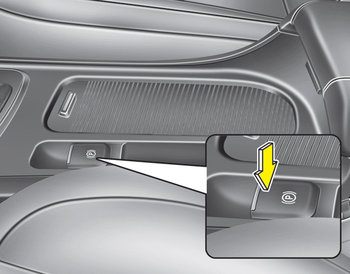
To release the EPB (electric parking brake), press the EPB switch in the following condition:
- Have the ignition switch or engine start/stop button in the ON position.
- Depress the brake pedal.
Make sure the brake warning light goes off.
To release EPB (electric parking brake) automatically:
• Manual transaxle vehicle
1. Start the engine.
2. Fasten the driver's seat belt.
3. Close the driver's door, engine hood
and tailgate.
4. Depress the clutch pedal with the
gear engaged.
5. Depress the accelerator pedal while
releasing the clutch pedal.
• Automatic transaxle vehicle
1. Start the engine.
2. Fasten the driver's seat belt.
3. Close the driver's door, engine hood
and tailgate.
4. Depress the accelerator pedal while
the shift lever is in R (Rear), D (Drive).
• Shift lever in P (Park)
With the engine running depress the brake pedal and shift out of P (Park) to R (Rear) or D (Drive).
• Shift lever in N (Neutral)
With the engine running depress the brake pedal and shift out of N (Neutral) to R (Rear) or D (Drive).
Make sure the brake warning light goes off.
✽ NOTICE
- For your safety, you can engage the EPB even though the ignition switch or engine stop/start button is in the OFF position, but you cannot release it.
- For your safety, depress the brake pedal and release the parking brake manually with the EPB switch when you drive downhill or when backing up the vehicle.
✽ NOTICE - Manual transaxle
A vehicle towing a trailer on a hill or on an incline may slightly roll backwards when starting the vehicle. To prevent the situation follow the below instructions.
1. Depress the clutch pedal and select a gear.
2. Keep pulling up the EPB switch.
3. Depress the accelerator pedal and slowly release the clutch pedal.
4. If the vehicle starts off with enough driving power release the EPB switch.
Do not follow the above procedure when driving on a flat level ground. The vehicle may suddenly move forward.
CAUTION
- If the parking brake warning light is still on even though the EPB has been released, we recommend that the system be checked by an authorized Kia dealer.
- Do not drive your vehicle with the EPB applied. It may cause excessive brake pad and brake rotor wear.
EPB (electric parking brake) may be automatically applied when:
- The EPB is overheated
- Requested by other systems
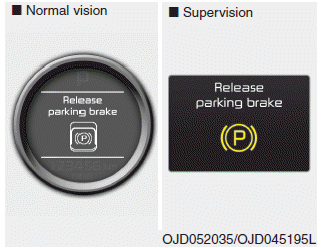
- If you try to drive off depressing the accelerator pedal with the EPB applied, but doesn't release automatically, a warning will sound and a message will appear.
- If the driver's seat belt is not fastened and any door, the engine hood or tailgate is opened, a warning will sound and a message will appear.
- If there is a problem with the vehicle, a warning may sound and a message may appear.
If the above situation occurs, depress the brake pedal and release EPB by pressing the EPB switch.
WARNING
- To prevent unintentional movement when stopped and leaving the vehicle, do not use the shift lever in place of the parking brake. Set the parking brake and make sure the shift lever is securely positioned in P (Park).
- Never allow anyone who is unfamiliar with the vehicle to touch the parking brake. If the parking brake is released unintentionally, serious injury may occur.
- All vehicles should always have the parking brake fully engaged when parking to avoid inadvertent movement of the car which can injure occupants or pedestrians.
CAUTION
- A click sound may be heard while operating or releasing the EPB, but these conditions are normal and indicate that the EPB is functioning properly.
- When leaving your keys with a parking lot attendant or valet, make sure to inform him/her how to operate the EPB.
- The EPB may malfunction if you drive with the EPB applied.
- When you automatically release EPB by depressing the accelerator pedal, depress it slowly.
 Applying the parking brake
To apply the EPB (electric parking
brake):
Pull up the EPB switch.
Make sure the warning light comes on.
✽ NOTICE
On a steep incline or when pulling a
trailer if the vehicle does not stan ...
 EPB malfunction indicator
This warning light illuminates if the
engine start/stop button is changed to
the ON position and goes off in approximately
3 seconds if the system is operation
normally.
If the EPB malfunct ...
Other information:
Kia Cee'd JD Service Manual: Power Door Mirror Actuator Repair procedures
Inspection
1.
Disconnect the negative (-) battery terminal.
2.
Remove the front door quadrant innen cover.
3.
Disconnect the connector (A) from the mirror.
4.
...
Kia Cee'd JD Service Manual: Front Wiper Motor Repair procedures
Removal
1.
Remove the cap (B) and remove the nuts, then remove the wiper arm (A).
Tightening torque :
22.6 ~ 26.5 N.m(2.3 ~ 2.7 kgf.m, 16.6 ~ 19.5 lb-ft)
2.
If necessary ...
