Kia Cee'd: Rear Bumper / Rear Bumper beam Assembly Repair procedures
| • |
Put on gloves to protect your hands.
|
|
| • |
Use a plastic panel removal tool to remove interior trim pieces
to protect from marring the surface.
|
| • |
Take care not to bend or scratch the cover and other parts.
|
|
| 1. |
Remove the rear bumper cover.
(Refer to Rear Bumper - "Rear Bumper Cover")
|
| 2. |
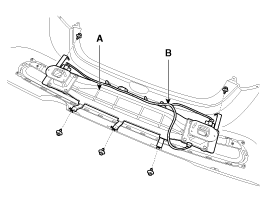
Disconnect the rear bumper beam mounting wiring harness (B).
|
| 3. |
Detach the clips, then remove the rear bumper beam assembly (A).
|
| 4. |
Install in the reverse order of removal.
| •
|
Replace any damaged clips.
|
| •
|
Make sure the connector is plugged in properly.
|
|
|
Component Location
1. Rear bumper beam assembly
...
Other information:
Kia Cee'd JD Owners Manual: 1. Activate Smart Parking Assist
System
Press the Smart Parking Assist
System button (the button indicator will
illuminate).
The Parking Assist System will be activated
(the button indicator will illuminate).
A warning sound will be heard if an
obstacle is detected.
Press the Smart Parking Assist
System button a ...
Kia Cee'd JD Owners Manual: Calendar / Clock / Outside ambient
Temperature
The monitor will display the outside ambient
temperature, date and time.
To change the date, time or temperature
unit(°C ↔ °F), press the SET(2) or Temp
button for more than 1 seconds.
Then you will enter the set-up mode and
mode changes in the following order as
you press the ...



 Rear Bumper beam Assembly Components and components location
 Front Seat