
Kia Cee'd: Dual Clutch Transmission Control System / Input Speed Sensor 1 Repair procedures
Kia Cee'd JD Service Manual / Dual Clutch Transmission(DCT) System / Dual Clutch Transmission Control System / Input Speed Sensor 1 Repair procedures
| Inspection |
Refer to DTC code "P2765, P2766" Input Shaft Speed Sensor.
| Removal |
| 1. |
Turn off the ignition switch and then disconnect the battery (-) cable.
|
| 2. |
Remove the under cover.
|
| 3. |
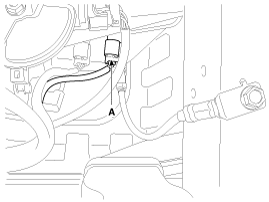
Disconnect the input shaft speed sensor connector (A).
|
| 4. |
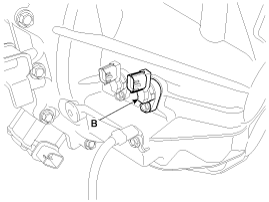
Loosen the mounting bolt and then remove the input shaft speed sensor
(B).
|
| Installation |
| 1. |
Install in the reverse order of removal.
|
 Input Speed Sensor 1 Schematic diagrams
Schematic Diagrams
...
 Input Speed Sensor 2 Description and operation
Description
The input shaft speed sensor is important in that it detects the input shaft
RPM and sends this information to the Transmission Control Module (TCM).
It provides i ...
Other information:
Kia Cee'd JD Service Manual: General market
MAINTENANCE UNDER SEVERE
USAGE CONDITIONS - EXCEPT EUROPE (INCLUDING RUSSIA)
The following items must be serviced more frequently on cars mainly used under
severe driving conditions.
Refer to the chart below for the appropriate maintenance intervals.
R : Replace
...
: Cooling System Capacity and Specification - 1.5L EcoBoost™
Use coolant that meets the defined
specification.
If you do not use coolant that meets the
defined specification, it could result in:
Component damage that your vehicle
warranty does not cover.
Reduced vehicle performance.
Capacities
Materials
...
© 2017-2026 www.kceed.com
