
Kia Cee'd: Light bulbs / High mounted stop light bulb replacement
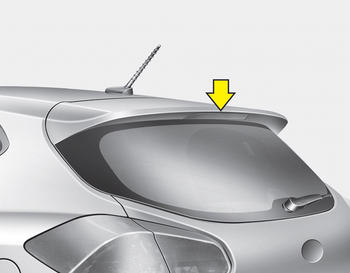
If the light does not operate, we recommend that the system be checked by an authorized Kia dealer.
 Rear fog light
1. Remove the under cover by rotating
the screws.
2. Reach your hand into the back of the
rear bumper.
3. Disconnect the power connector.
4. Remove the bulb-socket from the
housing by tur ...
 License plate light bulb replacement
1. Turn off the engine.
2. Remove the bulb assembly by pressing
the tabs.
3. Remove the socket by turning it counterclockwise.
4. Remove the bulb by pulling it straight
out.
5. Install a new ...
Other information:
Kia Cee'd JD Owners Manual: Folding the rear seat
The rear seatbacks (or cushions) may be
folded to facilitate carrying long items or
to increase the luggage capacity of the
vehicle.
WARNING
The purpose of the fold-down rear
seatbacks (or cushions) is to allow
you to carry longer objects than
could otherwise be accommodated.
Never a ...
Kia Cee'd JD Service Manual: Shift Lever Components and components location
Components
1. Shift lever assembly
2. Shift cable assembly
3. Retainer
4. Bolt
5. Nut
6. Manual control lever
...
© 2017-2026 www.kceed.com
