
Kia Cee'd: Dual Clutch Transmission Control System / Clutch Actuator Motor 2 (Even Gear) Repair procedures
Kia Cee'd JD Service Manual / Dual Clutch Transmission(DCT) System / Dual Clutch Transmission Control System / Clutch Actuator Motor 2 (Even Gear) Repair procedures
| Inspection |
| 1. |
Turn off the ignition switch.
|
| 2. |
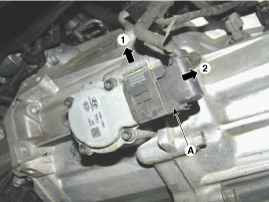
Disconnect the clutch motor connector (A).
|
| 3. |
Measure the resistance on the clutch motor terminal.
|
| 4. |
Refer to the specifications and check that the measured resistance is
as specified.
(Refer to Clutch Actuator Motor 2 - "Specification")
|
| Removal |
| 1. |
Turn off the ignition switch and then disconnect the battery (-) cable.
|
| 2. |
Remove the air cleaner assembly and air duct.
(Refer to Engine Mechanical System - "Air cleaner")
|
| 3. |
Remove the battery and battery tray.
(Refer to Engine Electrical System - "Battery")
|
| 4. |
Remove the ECM.
(Refer to Fuel System - "Engine Control Module (ECM)")
|
| 5. |
Disconnect the clutch actuator motor connector (A).
|
| 6. |
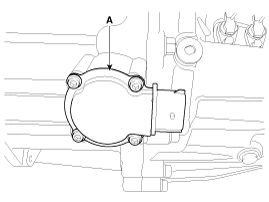
Loosen the mounting screw, and then remove the clutch actuator motor
(A).
|
| Installation |
| 1. |
Install in the reverse order of removal.
|

 Clutch Actuator Motor 2 (Even Gear) Schematic diagrams
Schematic Diagrams
...
 Gear Actuator Motor Description and operation
Description
The gear actuator motor is mounted on the complete shaft.
The gear actuator motor comprises the shift motor and select motor.
The gear actuator shift motor and se ...
Other information:
Kia Cee'd JD Service Manual: Repair procedures
Diagnosis With GDS
1.
BSD system defects can be quickly diagnosed with the GDS. GDS operates
actuator quickly to monitor, input/output value and self diagnosis.
2.
Connect the cable of GDS to the data link connector in driver si ...
Kia Cee'd JD Owners Manual: Warning message
• This warning message may appear
when :
- One or both of the sensors on the
rear bumper is blocked by dirt or snow
or a foreign object.
- Driving in rural areas where the BSD
sensor does not detect another vehicle
for an extended period of time.
- When there is inclement weather
...
© 2017-2026 www.kceed.com
