
Kia Cee'd: Interior features / Cargo security screen (wagon)
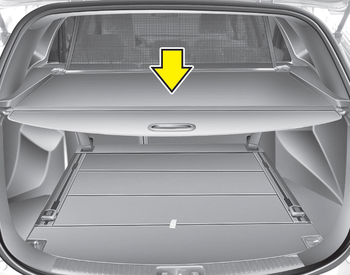
Use the cargo security screen to hide items stored in the cargo area.
 To remove the barrier net
1. Loosen the straps by using the strap
adjusters and remove the strap hooks
from the hook holders.
2. Remove the net upper shaft by pulling
it through the large holes.
3. Remove the barrier n ...
 To use the cargo security screen
1. Pull the cargo security screen towards
the rear of the vehicle by the handle
(1).
2. Insert the guide pin into the guide (2).
✽ NOTICE
Pull out the cargo security screen with
the handl ...
Other information:
Kia Cee'd JD Owners Manual: Driving on grades
Reduce speed and shift to a lower gear
before you start down a long or steep
downgrade. If you don’t shift down, you
might have to use your brakes so much
that they would get hot and no longer
operate efficiently.
On a long uphill grade, shift down and
reduce your speed to around 70 k ...
Kia Cee'd JD Owners Manual: Seat belt warning
Driver’s seat belt warning (1)
As a reminder to the driver, the seat belt
warning light will illuminate for approximately
6 seconds each time you turn the
ignition switch ON regardless of belt fastening.
If the driver’s seat belt is unfastened after
the ignition switch is ON, the sea ...
