
Kia Cee'd: Blind Spot Detection system / Blind Spot Detection Indicator Components and components location
Kia Cee'd JD Service Manual / Body Electrical System / Blind Spot Detection system / Blind Spot Detection Indicator Components and components location
| Components |
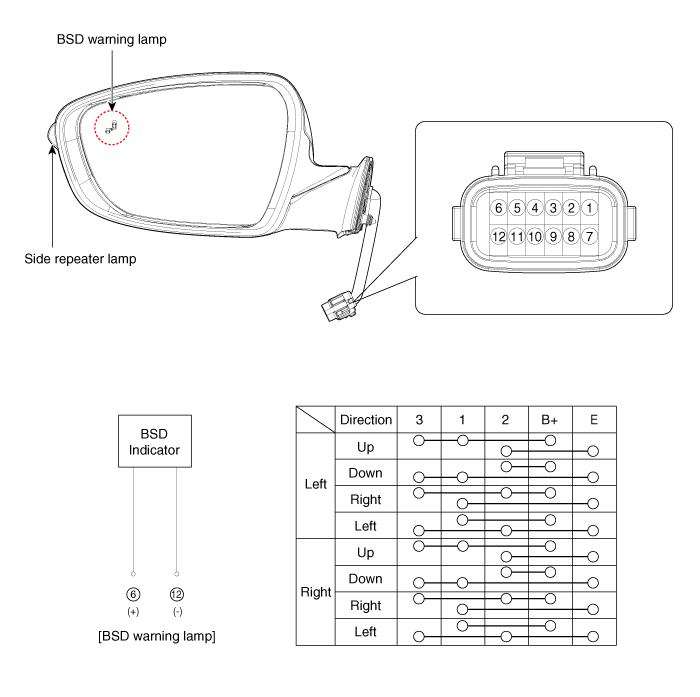
 Blind Spot Detection Switch Repair procedures
Removal
1.
Disconnect the negative (-) battery terminal.
2.
Remove the crash pad lower panel.
(Refer to Body - "Crash Pad ...
 Blind Spot Detection Indicator Repair procedures
Removal
1.
Disconnect the negative (-) battery terminal.
2.
Remove the mirror (A) from the mirror holder.
...
Other information:
: USB Ports. Apps. Supported Media Players, Formats and Metadata Information
USB Ports
The USB ports are located in the media bin
under the instrument panel.
This feature allows you to plug in USB
media devices, memory sticks, flash drives
or thumb drives, and charge devices if they
support this feature.
Select this option to play audio from your
USB device.
Apps
The s ...
: SYNC™ 3 Troubleshooting
Voice Recognition
USB and Bluetooth Audio
Phone
Navigation (If Equipped)
Apps
Wi-Fi Connectivity
Personal Profiles (If Equipped)
Resetting the System
Simultaneously press and hold the
seek up and the audio unit power
buttons until the screen goes black.
Wait three minutes to all ...
© 2017-2026 www.kceed.com
