
Kia Cee'd: Charging System / Alternator Repair procedures
Kia Cee'd JD Service Manual / Engine Electrical System / Charging System / Alternator Repair procedures
| Removal |
| 1. |
Disconnect the battery negative terminal.
|
| 2. |
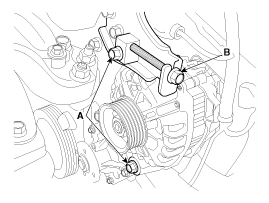
Loosen the mounting bolts (A) and then, turn the adjusting bolt (B)
clockwise to loosen tension.
|
| 3. |
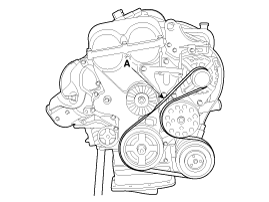
Remove the drive belt (A).
|
| 4. |
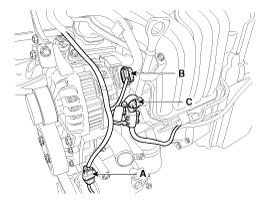
Disconnect the air compressor connector (A) and the alternator connector
(B), and remove the cable from alternator "B" terminal (C).
|
| 5. |
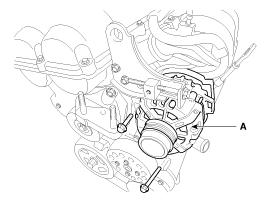
Remove the alternator (A).
|
| Installation |
| 1. |
Install in the reverse order of removal.
|
| 2. |
Adjust the alternator belt tension after installation.
(Refer to Engine Mechanical System - "Drive Belt")
|
| Disassembly |
| 1. |
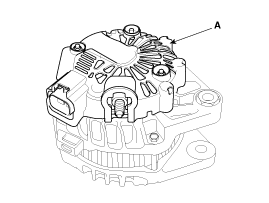
Remove the rear cover (A) after removing nuts.
|
| 2. |
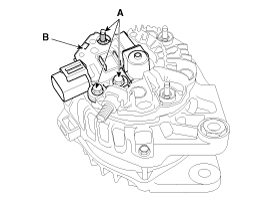
Remove the mounting bolts (A) and the brush holder assembly (B).
|
| 3. |
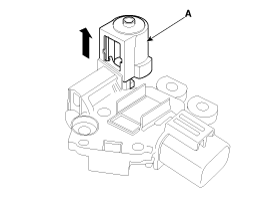
Remove the slip ring guide (A) after pulling it.
|
| 4. |
Remove the OAD(Overrunning Alternator Decoupler) cap.
|

| 5. |
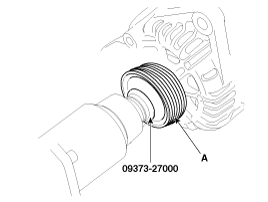
Remove the OAD(Overrunning Alternator Decoupler) pulley (A) using the
special tool.
|
| 6. |
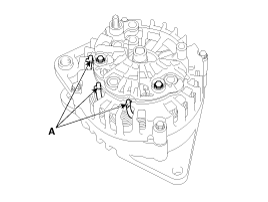
Unsolder the 3 stator leads (A).
|
| 7. |
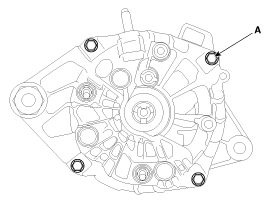
Remove the 4 through bolts (A).
|
| 8. |
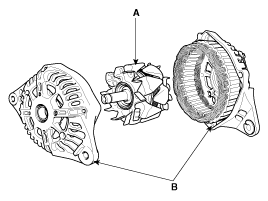
Disconnect the rotor (A) and bracket (B).
|
| Reassembly |
| 1. |
Reassemble in the reverse order of disassembly.
|
| Inspection |
| [Rotor] |
| 1. |
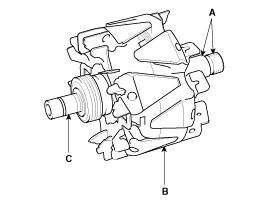
Check that there is continuity between the slip rings (C).
|
| 2. |
Check that there is no continuity between the slip rings and the rotor
(B) or rotor shaft (A).
|
| 3. |
If the rotor fails either continuity check, replace the alternator.
|
| [Stator] |
| 1. |
Check that there is continuity between each pair of leads (A).
|
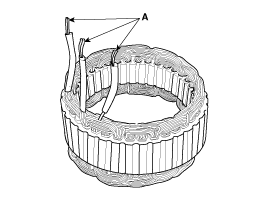
| 2. |
Check that there is no continuity between each lead and the coil core.
|
| 3. |
If the coil fails either continuity check, replace the alternator.
|
 Alternator Schematic diagrams
Circuit Diagram
...
 DC DC Converter Description and operation
Description
Due to the considerably more frequent occurrence of starting operations, the
electrical load that occurs often leads to voltage dips in the vehicle network.
In ord ...
Other information:
Kia Cee'd JD Owners Manual: SLIF activation / deactivation
SLIF Setting method :
Cluster User Settings → Driving Assist
→ SLIF (Speed Limit Information
Function)
The information of speed limit and no
passing restriction will appear on the
cluster using a symbol if you have activated
SLIF in User Settings of cluster.
If SLIF is ...
Kia Cee'd JD Owners Manual: Switching to Media Mode
Pressing the key will change
the operating mode in order of CD ➟
USB (iPod®) ➟ AUX ➟ My Music ➟
BT Audio.
If [Pop-up Mode] / [Mode Pop-up] is
turned on within [Display],
then pressing the key will display
the Media Pop-up Mode screen.
Turn the TUNE knob to move the
focus ...
© 2017-2026 www.kceed.com
