
Kia Cee'd: Instrument cluster (Super vision) / Speed limiter indicator
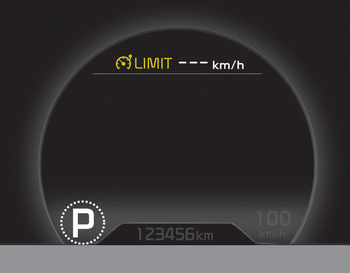
The indicator illuminates when the speed
limit control system is enabled by move
the  lever up on the steering
wheel.
lever up on the steering
wheel.
The indicator goes off when the
lever
up again to deactivate the system.
If there is a problem with the speed limit control system, the “---” indicator will blink. If this occurs, we recommend that the system be checked by an authorized Kia dealer.
For more details, refer to “Speed limit control system” in chapter 5.
The speed limiter indicators illuminates on the LCD display.
 Dual clutch transmission
(DS mode) shift indicator
Dual clutch transmission
(DS mode) shift indicator
The indicator displays which Dual clutch
transmission shift lever is selected.
In DS mode, the “S” indicator displays
with “SPORTS” indicator in cluster. For
more detailed information ...
 Odometer (km or mi.)
■ Type A
■ Type B
The odometer indicates the total distance
the vehicle has been driven.
You will also find the odometer useful to
determine when periodic maintenance
should be perfor ...
Other information:
Kia Cee'd JD Service Manual: Power Mosfet (DATC) Repair procedures
Inspection
1.
Turn the ignition switch ON.
2.
Manually operate the control switch and measure the voltage of the blower
motor.
3.
Select the control switch to raise the voltage until high speed.
...
Kia Cee'd JD Owners Manual: Transmitter precautions
✽ NOTICE
The transmitter will not work if any of
following occur:
The ignition key is in ignition switch.
You exceed the operating distance
limit (about 10 m [30 feet]).
The battery in the transmitter is
weak.
Other vehicles or objects may be
blocking the signal.
The weathe ...
