
Kia Cee'd: Dual Clutch Transmission Control System / Shift Lever Repair procedures
Kia Cee'd JD Service Manual / Dual Clutch Transmission(DCT) System / Dual Clutch Transmission Control System / Shift Lever Repair procedures
| Removal |
| 1. |
Remove the floor console assembly.
(Refer to Body - "Floor Console")
|
| 2. |
Remove the air duct.
|
| 3. |
Disconnect the control cable (A).
|
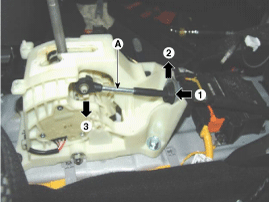
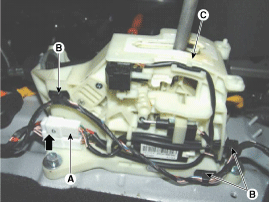
| 4. |
Disconnect the connector (A).
|
| 5. |
Disconnect the wire mounting clips (B).
|
| 6. |
Remove the bolt and then the shift lever assembly (C).
|
| Installation |
| 1. |
Install in the reverse order of removal.
|

 Shift Lever Components and components location
Components
1. Shift lever assembly
2. Shift cable assembly
3. Retainer
4. Bolt
5. Nut
6. Manual control lever
...
 Shift Cable Components and components location
Components
1. Shift lever assembly
2. Shift cable assembly
3. Retainer
4. Bolt
5. Nut
6. Manual control lever
7. Knob
...
Other information:
Kia Cee'd JD Owners Manual: Warnings and indicators
(Instrument cluster)
All warning lights are checked by turning
the ignition switch ON (do not start the
engine). If any light that does not illuminate,
we recommend that the system be
checked by an authorized Kia dealer.
After starting the engine, check to make
sure that all warning lights are off. If any
a ...
: Setting the Liftgate Opening Height
Open the liftgate.
Stop the liftgate movement by pressing
the control button on the liftgate when
it reaches the desired height.Note: Once the liftgate stops moving,
you
can manually move it to the desired height.
Press and hold the control button on
the liftgate until a tone sounds,
...
© 2017-2026 www.kceed.com
