Kia Cee'd: Clutch Switch / Repair procedures
Signal Circuit Inspection
| 1. |
Check clutch switch pull-up voltage
| (1) |
IG KEY "OFF", ENGINE "OFF".
|
| (2) |
Disconnect clutch switch connector.
|
| (4) |
Measure the voltage between signal terminal of clutch switch
harness connector and chassis ground.
|
Specification : 11.5V ~ 13.0V
|
|
|
| 2. |
Check open in clutch switch signal circuit
| (1) |
IG KEY "OFF", ENGINE "OFF".
|
| (2) |
Disconnect clutch switch connector and ECM connector.
|
| (3) |
Check continuity between signal terminal of clutch switch harness
connector and ECM harness connector.
|
Specification : Continuity ( below 1.0Ω )
|
|
|
Ground Circuit inspection
| 1. |
IG KEY "OFF", ENGINE "OFF".
|
| 2. |
Disconnect clutch switch connector.
|
| 3. |
Check continuity between clutch switch connector terminal 1 and chassis
ground.
|
Specification : Continuity ( below 1.0Ω )
|
|
Component Inspection
| 1. |
Remove the clutch switch.
|
| 2. |
Push the clutch switch in the direction of the arrow to make sure that
continuity is cut off.
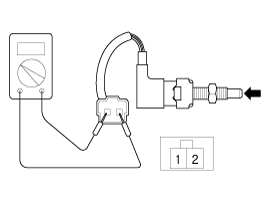
|
Condition
|
Clutch Pedal pressed
|
Clutch Pedal Released
|
Switch Operation
|
ON (below 1.0Ω )
|
OFF ( Infinite Ω )
|
|
|
| 1. |
Turn ignition switch OFF and disconnect the negative (-) battery cable.
|
| 2. |
Disconnect clutch switch connector (A).
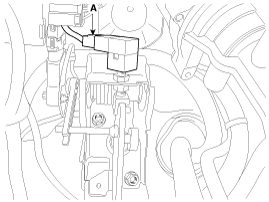
|
| 3. |
Remove the clutch switch (B) by loosening a nut (A).
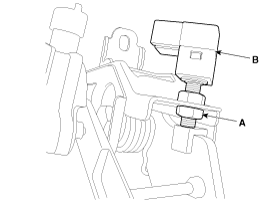
|
| 1. |
Install in the reverse order of removal.
|
| 2. |
Adjust the clutch switch.
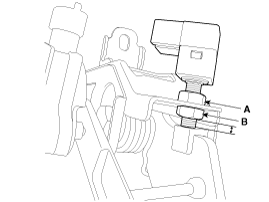
| (1) |
Adjust the gab by rotating the adjust nut (A) to satisfy the
standard gap range.
|
Standard gap range:
0.5 ~ 1.0 mm (0.0197 ~ 0.0394 in.)
|
|
| (2) |
Tighten the nut (B) with the specified torque.
|
Tightening torque:
7.8 ~ 9.8 N (0.8 ~ 1.0 kgf.m, 5.8 ~ 7.2 lb-ft)
|
|
|
Specifications
Item
Specifications
Working voltage
DC
12V
Operating force
14.7 ± ...


 Specifications
