Kia Cee'd: Interior Trim / Front Pillar Trim Repair procedures
| • |
Put on gloves to protect your hands.
|
|
| • |
Use a plastic panel removal tool to remove interior trim pieces
to protect from marring the surface.
|
| • |
Take care not to bend or scratch the trim and panels.
|
|
| 1. |
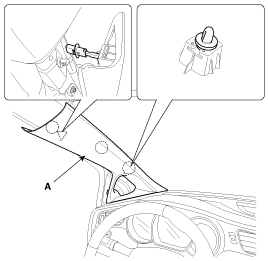
Using a screwdriver or remover, remove the front pillar trim (A).
|
| 2. |
Install in the reverse order of removal.
| •
|
Replace any damaged clips.
|
|
|
Component Location
1. Front pillar trim
...
Component Location
[5Door]
1. Center pillar lower trim
2. Center pillar upper trim
[3Door]
...
Other information:
Kia Cee'd JD Owners Manual: For 15, 16 inch tire
For safe operation, carefully read
and follow the instructions in this
manual before use.
(1) Compressor
(2) Sealant bottle
The Tire Mobility Kit is a temporary
fix to the tire and we recommend that
the system be inspected by an
authorized Kia dealer.
CAUTION
When two or more tires ...
Kia Cee'd JD Service Manual: Components and components location
Components
1. Hands free call switch
2. Mic
3. Front left speaker
4. Front right speaker
5. Audio head unit (hands free control)
※ There is no hands free jack.
This system supports Bluetooth(wireless system).
...



 Front Pillar Trim Components and components location
 Center Pillar Trim Components and components location