
Kia Cee'd: Rear Wiper/Washer / Rear Wiper Motor Repair procedures
Kia Cee'd JD Service Manual / Body Electrical System / Rear Wiper/Washer / Rear Wiper Motor Repair procedures
| Inspection |
Rear Wiper Motor
| 1. |
Remove the 4P connector from the rear wiper motor.
|
| 2. |
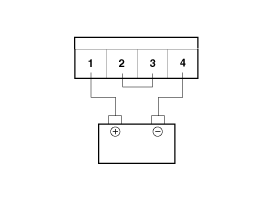
Connect battery positive (+) and negative (-) cables to terminals 3
and 4 respectively.
|
| 3. |
Check that the motor operates normally. Replace the motor if it operates
abnormally.
|
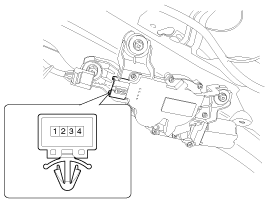
Automatic Stop Operation Check
| 1. |
Operate the motor at low speed using the stalk control.
|
| 2. |
Stop the motor operation anywhere except at the off position by disconnecting
terminal 3.
|
| 3. |
Connect terminals 2 and 3.
|
| 4. |
Connect the positive (+) lead from the battery to terminal 1 and the
negative (-) lead to terminal 4.
|
| 5. |
Check that the motor stops running at the off position.
|
| Removal |
| 1. |
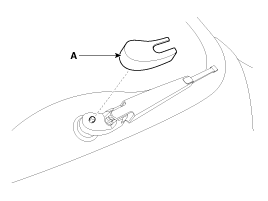
Detach the rear wiper cap (A).
|
| 2. |
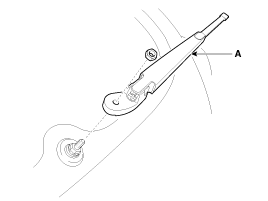
Remove the rear wiper arm & blade (A) after removing rear wiper nut
(B).
|
| 3. |
Open the tailgate then remove the tailgate trim.
(Refer to Body - "Tailgate Trim")
|
| 4. |
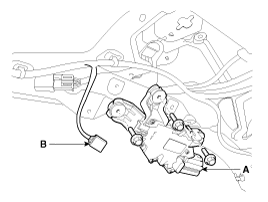
Disconnect the rear wiper motor connector (B) then remove the rear wiper
motor (A) after loosening bolts (3EA).
|
| Installation |
| 1. |
Install the rear wiper motor assembly and the grommet.
|
| 2. |
Install the tailgate trim.
|
| 3. |
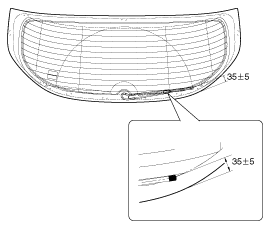
Set the rear wiper blade and to the lowest defogger heat line and tailgate
glass.
|
| 4. |
Install the rear wiper cap and rear wiper nut.
|
 Components and components location
Component Location
1. Head cap
2. Rear wiper arm nut
3. Rear wiper arm & blade
4. Grommat
5. Rear wiper motor
6. Rear wiper motor bolt
...
 Rear Washer Switch Repair procedures
Inspection
Check for continuity between the terminals while operating the wiper and washer
switch. If it is not normal condition, replace wiper and wiper switch.
Rear W ...
Other information:
: Programming the Garage Door Opener to Your Gate Opener Motor
Gate Operator / Canadian Programming
Canadian radio-frequency laws require
transmitter signals to “time-out” (or quit)
after several seconds of transmission –
which may not be long enough for
HomeLink to pick up the signal during
programming. Similar to this Canadian law,
some U.S. gate ...
: Pre-Collision Assist – Troubleshooting
Pre-Collision Assist – Information Messages
Pre-Collision Assist – Frequently Asked Questions
Camera Troubleshooting
The windshield in front of the camera
is dirty or obstructed.
Clean the outside of the windshield in
front of the camera.
The windshield in front of the camera
is clean, but t ...
© 2017-2026 www.kceed.com
