
Kia Cee'd: Rear Seat / Rear Seat Back Cover Components and components location
Kia Cee'd JD Service Manual / Body (Interior and Exterior) / Rear Seat / Rear Seat Back Cover Components and components location
| Component Location |
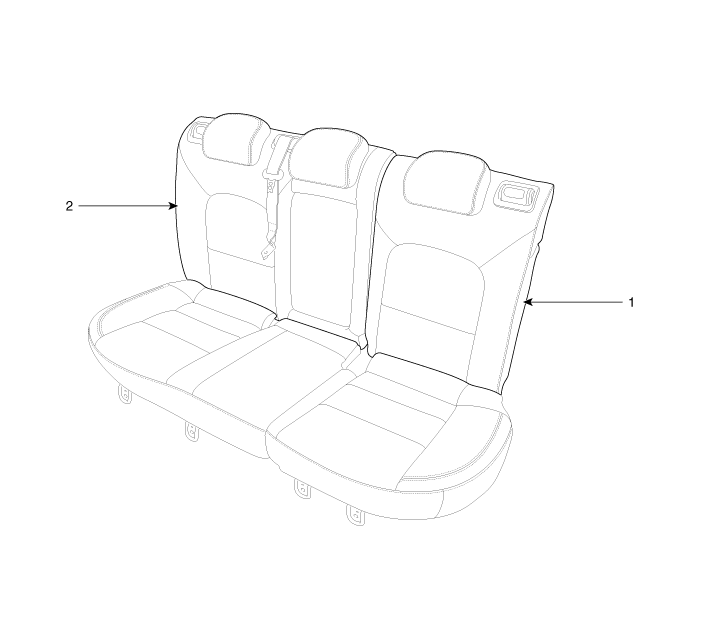
| 1. Rear seat back cover [LH]
|
2. Rear seat back cover [RH]
|
 Rear Seat Assembly Repair procedures
Replacement
1.
After loosening the mounting bolts and then push it up and remove the
rear seat cushion assembly (A).
Tightening torque ...
 Rear Seat Back Cover Repair procedures
Replacement
[LH]
•
Put on gloves to protect your hands.
...
Other information:
Kia Cee'd JD Owners Manual: Storage compartment
CAUTION
To avoid possible theft, do not
leave valuables in the storage
compartment.
Always keep the storage compartment
covers closed while
driving. Do not attempt to place
so many items in the storage
compartment that the storage
compartment cover can not close
securel ...
Kia Cee'd JD Owners Manual: Engine compartment precautions
(Diesel engine)
The injector operates at high voltage
(maximum 200v). Therefore, the following
accidents may occur.
- Direct contact with the injector or
injector wiring may cause electric
shock or damage your muscle or
nerve system.
- The electromagnetic wave from the
operating injector ma ...
© 2017-2026 www.kceed.com
