
Kia Cee'd: Lighting System / Rear Fog Lamps Repair procedures
Kia Cee'd JD Service Manual / Body Electrical System / Lighting System / Rear Fog Lamps Repair procedures
| Inspection |
| 1. |
Disconnect the negative (-) battery terminal.
|
| 2. |
Remove the lighting switch of the multifunction switch.
(Refer to Multifunction Switch)
|
| 3. |
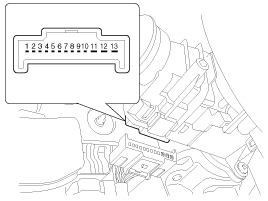
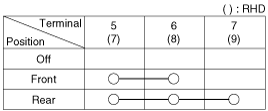
With the front fog lamp switch, make sure that continuity exists between
the terminals below.
If continuity is not as specified, replace the multi-function switch.
Fog Lamp
|
| Removal |
| 1. |
Disconnect the negative (-) battery terminal.
|
| 2. |
Remove the rear bumper cover.
(Refer to Body - "Rear Bumper Cover")
|
| 3. |
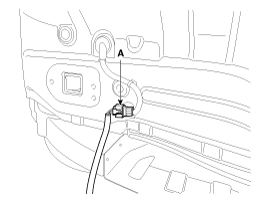
Disconnect the rear bumper main connector (A).
|
| 4. |
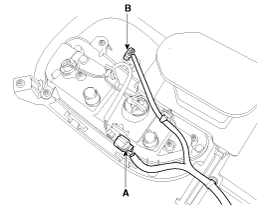
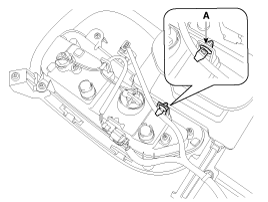
Disconnect the rear fog lamp connector (A) and ultrasonic sensor connector
(B).
Separate the wiring harness fixed clip (A) from the rear fog lamp assembly.
|

| 5. |
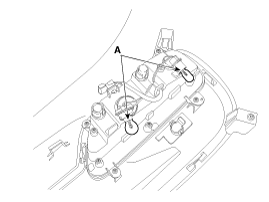
Remove the bulb (A) after turning it counterclockwise.
|
| 6. |
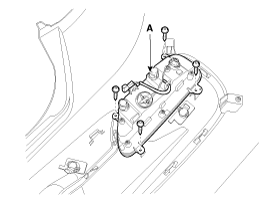
Remove the rear fog lamp assembly (A) after loosening the mounting screws.
|
| Installation |
| 1. |
Install the rear fog assembly and connect the connector.
|
| 2. |
Install the rear bumper cover.
|
 Front Fog Lamps Repair procedures
Inspection
1.
Disconnect the negative (-) battery terminal.
2.
Remove the lighting switch of the multifunction switch.
(Refer t ...
 High Mounted stop lamp Repair procedures
Removal
1.
Disconnect the negative (-) battery terminal.
2.
Remove the rear spoiler assembly (A).
(Refer to Body - "Rear S ...
Other information:
Kia Cee'd JD Service Manual: Specifications
Specifications
Description
Specifications
Limit
General
Type
In-line, DOHC
Number of cylinders
4
Bore
...
: Mobile Device Data
If you connect a mobile device to your
vehicle, you can display data from your
device on the touchscreen for example,
music and album art. You can share your
vehicle data with mobile apps on your
device through the system.
The mobile apps function operates by your
connected device sending data ...
© 2017-2026 www.kceed.com
