
Kia Cee'd: Lighting System / Front Fog Lamps Repair procedures
Kia Cee'd JD Service Manual / Body Electrical System / Lighting System / Front Fog Lamps Repair procedures
| Inspection |
| 1. |
Disconnect the negative (-) battery terminal.
|
| 2. |
Remove the lighting switch of the multifunction switch.
(Refer to Multifunction Switch)
|
| 3. |
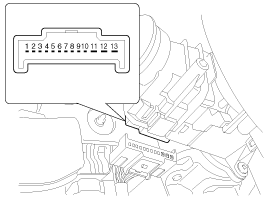
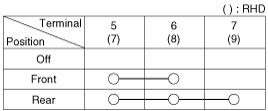
With the front fog lamp switch, make sure that continuity exists between
the terminals below.
If continuity is not as specified, replace the multifunction switch.
Fog Lamp
|
| Removal |
| 1. |
Disconnect the negative (-) battery terminal.
|
| 2. |
Remove the front bumper cover.
(Refer to Body - "Front Bumper Cover")
|
| 3. |
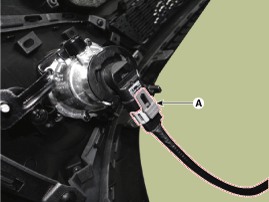
Remove the front fog lamp connector (A) from the front bumper.
|
| 4. |
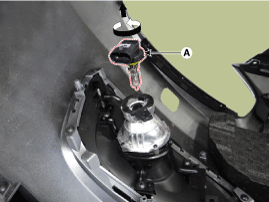
Remove the front fog bulb (A) after turning it counterclockwise.
|
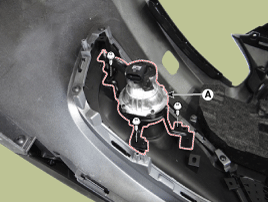
| 5. |
Remove the front fog lamp assembly (A) after loosening 4 screws.
|
| Installation |
| 1. |
Install the front fog bulb and connect the connect.
|
| 2. |
Install the front fog lamp assembly.
|
| 3. |
Install the front bumper cover.
|
 Rheostat Repair procedures
Inspection
1.
Disconnect the negative (-) battery terminal.
2.
Remove the crash pad lower panel.
(Refer to Body - "Crash P ...
 Rear Fog Lamps Repair procedures
Inspection
1.
Disconnect the negative (-) battery terminal.
2.
Remove the lighting switch of the multifunction switch.
(Refer t ...
Other information:
Kia Cee'd JD Owners Manual: Basic Mode Screen
(1) Mode Display
Displays currently operating mode.
(2) Frequency
Displays the current frequency.
(3) Preset
Displays current preset number 1
~ 6.
(4) Preset Display
Displays saved presets.
(5) Auto Store
Automatically saves frequencies with
superior reception to Preset buttons.
(6 ...
Kia Cee'd JD Service Manual: Vacuum Pump Repair procedures
Removal
Gamma 1.6 T-GDI
1.
Turn ignition switch OFF and disconnect the negative (-) battery cable.
2.
Remove the under covers (A).
Tightening torque:
3.9 ~ 5.9 N.m (0.4 ~ 0.6 kgf.m, 2.9 ~ ...
© 2017-2026 www.kceed.com
