
Kia Cee'd: Rear Door / Rear Door Latch Repair procedures
Kia Cee'd JD Service Manual / Body (Interior and Exterior) / Rear Door / Rear Door Latch Repair procedures
| Replacement |
| 1. |
Remove the rear door module.
(Refer to Rear Door - "Rear Door Module")
|
| 2. |
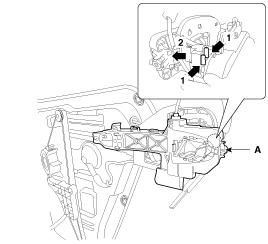
Remove the rear door outside handle base (A) by pushing in the lock
pins located in the back.
|
| 3. |
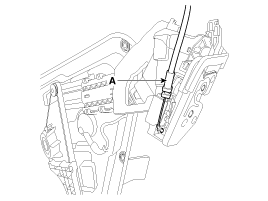
Disconnect the rear door outside handle cable (A).
|
| 4. |
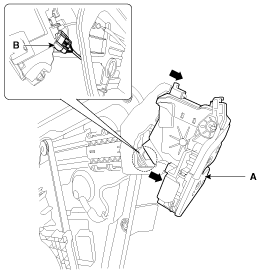
Disconnect the rear door latch connector (B).
|
| 5. |
Remove the rear door latch assembly (A) by pulling it.
|
| 6. |
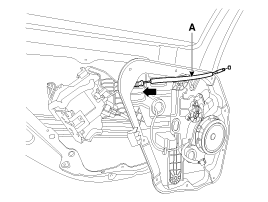
Remove the rear door inside handle cable (A) by pulling it.
|
| 7. |
Install in the reverse order of removal.
|

 Rear Door Latch Components and components location
Component Location
1. Rear door latch
...
 Rear Door Belt Outside Weatherstrip Repair procedures
Replacement
1.
Pull down rear door window glass by pressing the power window glass
switch.
2.
After loosening the mounting screws, ...
Other information:
Kia Cee'd JD Owners Manual: Horn
To sound the horn, press the horn symbol
on your steering wheel.
Check the horn regularly to be sure it
operates properly.
✽ NOTICE
To sound the horn, press the area indicated
by the horn symbol on your steering
wheel (see illustration). The horn will
operate only when this area is ...
Kia Cee'd JD Owners Manual: Weight of the trailer tongue
The tongue load of any trailer is an
important weight to measure because it
affects the total gross vehicle weight
(GVW) of your vehicle. This weight
includes the curb weight of the vehicle,
any cargo you may carry in it, and the
people who will be riding in the vehicle.
And if you w ...
© 2017-2026 www.kceed.com
