
Kia Cee'd: Trip computer / Distance to empty (km or mi.)
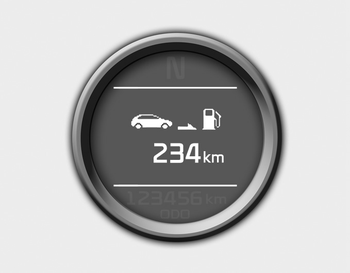
This mode indicates the estimated distance the vehicle can be driven with the remaining fuel. When the remaining distance is below 50 km (30 miles), “---” will be displayed.
The meter’s working range is from 50 to 999 km (30 to 999 miles).
 Tripmeter (km or mi.)
This mode indicates the distance of individual
trips selected since the last tripmeter
reset.
The meter's working range is from 0.0 to
9999.9 km (0.0 to 9999.9 miles).
Pressing the button f ...
 Average fuel economy (L/100 km or MPG)
This mode calculates the average fuel
consumption from the total fuel used and
the distance since the last average fuel
economy reset. The total fuel used is calculated
from the fuel consump ...
Other information:
Kia Cee'd JD Owners Manual: Follow the steps 1 to 7 from the previous
chapter.
8. Remove the cover by turning it counterclockwise.
9. Disconnect the headlight bulb socketconnector.
10. Unsnap the headlight bulb retaining
wire by depressing the end and pushing
it upward.
11. Remove the bulb from the headlight
assembly.
12. Install a new headlight bulb and snap
the h ...
Kia Cee'd JD Owners Manual: Mode selection
The mode selection button controls the direction of the airflow in the
vehicle.
If you push the button once, the corresponding switch will turn on, and if you
push the
button again, the switch will turn off.
Face-Level (B, D, F*)
Air flow is directed toward the upper body
and face. ...
