
Kia Cee'd: RCTA (Rear cross traffic alert) / Warning type
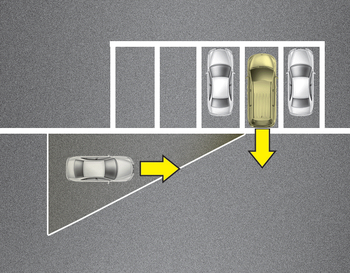
- If the vehicle detected by the sensors approaches your vehicle, the warning chime will sound, the warning light on the outside rearview mirror will blink.
- If the detected vehicle is out of detection range, moving away in the opposite direction or moving slow, the warning is cancelled.
- The system may not operate properly due to other factors or circumstances. Always pay attention to your surrounding.
- If the sensing area near the rear bumper is blocked by either a wall or barrier or by a parked vehicle, the system sensing area may be reduced.
The BSD indicator on the outer side view mirror may not illuminate properly when:
- The outside rearview mirror housing is damaged.
- The mirror is covered with dirt, snow, or debris.
- The window is covered with dirt, snow, or debris.
- The window is tinted.
 Operating conditions
Select RCTA (Rear Cross Traffic Alert)
in "User Settings" under "Driving Assist"
on the instrument cluster. The system
will turn on and stand by to be activated.
Select RCTA again, to ...
 Driver’s Attention
The driver must be cautious in the below
situations, because the system may not
detect other vehicles or objects in certain
circumstances.
The vehicle drives on a curved road or
through a ...
Other information:
Kia Cee'd JD Owners Manual: Basic Mode Screen
(1) Mode Display
Displays currently operating mode.
(2) Frequency
Displays the current frequency.
(3) Preset
Displays current preset number 1
~ 6.
(4) Preset Display
Displays saved presets.
(5) Auto Store
Automatically saves frequencies with
superior reception to Preset buttons.
(6 ...
Kia Cee'd JD Owners Manual: Don't let your parking brake
freeze
Under some conditions your parking
brake can freeze in the engaged position.
This is most likely to happen when there
is an accumulation of snow or ice around
or near the rear brakes or if the brakes
are wet. If there is a risk the parking
brake may freeze, apply it only temporarily
wh ...
