
Kia Cee'd: Cruise Control system / To increase cruise control set speed
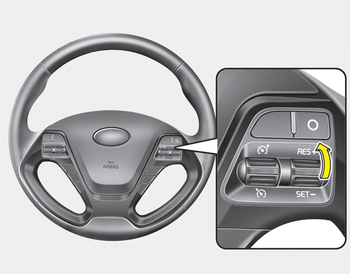
Follow either of these procedures:
- Move the lever up (to RES+) and hold it.Your vehicle will accelerate. Release the lever at the speed you want.
- Move the lever up (to RES+) and release it immediately. The cruising speed will increase by 2 km/h (1 mph) each time you move the lever up (to RES+) in this manner.
 To set cruise control speed
1. Move the lever down () on the
steering wheel, to turn the system on.
The cruise indicator light will illuminate.
2. Accelerate to the desired speed, which
must be more than 30 km/h (20 mph ...
 To decrease the cruising speed
Follow either of these procedures:
Move the lever down (to SET-) and
hold it. Your vehicle will gradually slow
down. Release the lever at the speed
you want to maintain.
Move the leve ...
Other information:
Kia Cee'd JD Service Manual: Flex Steering Repair procedures
Inspection
1.
Check the audio remote control switch (A) for resistance between terminals
in each switch position.
Switch
Connector terminal
Resistance (±5%)
...
Kia Cee'd JD Owners Manual: Electronic Parking Brake
(EPB) malfunction
indicator
The EPB malfunction indicator will illuminate
when the ignition switch is turned
ON, but should go off after approximately
3 seconds. If the warning light does not
come on, or continuously remains on we
recommend that the system be checked
by an authorized Kia dealer.
Also, the EPB ma ...
