
Kia Cee'd: Button Engine Start System / Start/Stop Button Components and components location
Kia Cee'd JD Service Manual / Body Electrical System / Button Engine Start System / Start/Stop Button Components and components location
| Component |
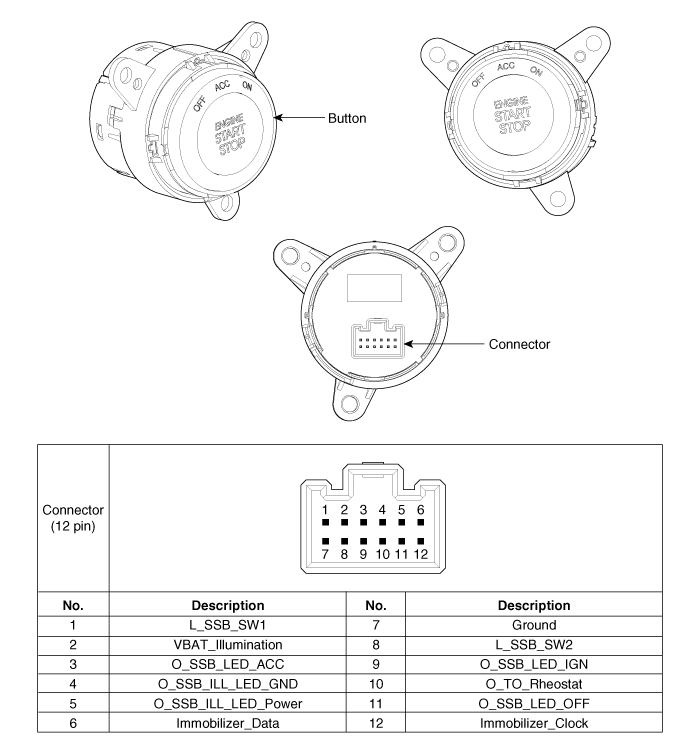
 Description and operation
Description
System Overview
The System offers the following features:
–
Human machine interface through a 1-stage button, for terminal switching
and en ...
 Start/Stop Button Repair procedures
Removal
1.
Disconnect the negative (-) battery terminal.
2.
Remove the crash pad center fascia panel.
(Refer to Body - "Ce ...
Other information:
: Towing a Trailer Precautions. Trailer Brake Precautions
Towing a Trailer Precautions
WARNING: Do not exceed
the GVWR or the GAWR
specified on the certification
label.
WARNING: Towing trailers
beyond the maximum
recommended gross trailer
weight exceeds the limit of your
vehicle and could result in engine
damage, transmission damage,
structural da ...
Kia Cee'd JD Owners Manual: Using the transmitter
Park the vehicle and stop the engine.
Arm the system as described below.
1.Turn off the engine and remove the
ignition key from the ignition switch.
2.Make sure that all doors, the engine
hood and tailgate are closed and
latched.
3.Lock the doors by pressing the lock
button on the trans ...
© 2017-2026 www.kceed.com
